WMI - Management Interface
Interface structure and activity launch
The WMI provides a set of intents that developers can use to build apps that work with the interface.
For management purpose com.worldline.management.action.PROCESS_OPERATION intent should be used.
| Type | Category | Intent | Purpose |
|---|---|---|---|
| Management | Display Action - these actions start the payment solution that are processing financial transactions or require user interaction. Notice: Android intents are used | com.worldline.payment.action.PROCESS_OPERATION | Process a management request |
Here is intent creation code:
    public Intent formatWmiRequest(String sessionId, WpiPurchaseRequest req) \{
        String json = GSON.toJson(req);

        Intent intent = new Intent("com.worldline.management.action.WMI_SVC_CHECK_STATUS");
        intent.addFlags(Intent.FLAG_ACTIVITY_REORDER_TO_FRONT);
        intent.putExtra("WMI_SERVICE_TYPE", "WPI_SVC_PAYMENT");
        intent.putExtra("WMI_REQUEST", json);
        intent.putExtra("SHOW_OVERLAY ", false)

        return intent;
    }
Intent contains a set of extras and needs to have FLAG_ACTIVITY_REORDER_TO_FRONT set.
| Extra | Descritpion | Type | Condition |
|---|---|---|---|
| WMI_SERVICE_TYPE | Specify the subtype of action to be executed: - WMI_SVC_CHECK_STATUS - Service type for checking current Tap on Mobile application status - WMI_SVC_REGISTER - Service type for initiating the terminal enrollment sequence - WMI_SVC_AUTH_UNREGISTER - Service type for unregistering the terminal by the 3rd party application package used previously for enrollment | String | Mandatory |
| WMI_REQUEST | The request contains JSON structured data that is mandatory for the given service type. The JSON structure is described in the following chapters for each function. | String | Mandatory |
| SHOW_OVERLAY | The flag controls whether a transparent overlay (false) or a spinner (true) should be displayed at the start of the intent. | Boolean | Optional |
To launch intent registerForActivityResult method should be used. In the response, the intent returns the following data.
| Extra | Descritpion | Type | Condition |
|---|---|---|---|
| WMI_SERVICE_TYPE | Specify the subtype of action to be executed | String | Mandatory |
| WMI_RESPONSE | The response contains JSON structured data processed for the requested service type | String | Mandatory |
And here is response parsing sample code:
    public WmiPurchaseResponse parsePurchaseResponse(ActivityResult result) \{
        if (result.getResultCode() == Activity.RESULT_CANCELED) \{
            throw new RuntimeException("Intent cancelled.");
        }
        if (result.getResultCode() != Activity.RESULT_OK) \{
            throw new RuntimeException("Invalid result code: " + result.getResultCode());
        }

        Intent intent = result.getData();
        if (intent == null) \{
            throw new RuntimeException("Received intent without bundled data");
        }

        String json = intent.getStringExtra("WMI_RESPONSE");

        WmiPurchaseResponse resp = GSON.fromJson(json, WmiPurchaseResponse.class);


        return resp;
    }
| Please remember |
|---|
| The important thing to note is that ToM can only handle one intent invocation at a time (of any intent type — it doesn’t matter whether it’s a financial or informational function). Therefore, it is crucial to make the next request only after receiving the response from the previous one. |
Checking application status
This function is intended to be used outside of payment acceptance context to determine the current Tap on Mobile application status and assess whether it is properly authenticated and ready to perform payment acceptance functions.
Request
| Extra | Desription | Type | Condition |
|---|---|---|---|
| WMI_SERVICE_TYPE | WMI_SVC_CHECK_STATUS | String | Mandatory |
WMI_SVC_CHECK_STATUS - list of supported request parameters None – might be created for future use.
Response
| Extra | Desription | Type | Condition |
|---|---|---|---|
| WMI_SERVICE_TYPE | WMI_SVC_CHECK_STATUS | String | Mandatory |
| WMI_RESPONSE | JSON structured response parameters as described in subsequent table | String | Mandatory |
WMI_SVC_CHECK_STATUS - list of supported response parameters
| Field name | Description | Type | Condition |
|---|---|---|---|
| result | Result of the transaction: - WMI_RESULT_SUCCESS In case of successful transaction- WMI_RESULT_FAILURE In case of failed transaction | String | Mandatory |
| errorCondition | Specific error reason For more information check WMI Error codes) | String | Mandatory |
| remark | Terminal / transaction specific message for detailed error descriptions. Text provided by payment app. | String | Conditional – only for NOT successful transaction |
| appStatus | Tap on Mobile application status indicating whether application is already registered. For more information check Application statuses |
Terminal registration
This function is intended to be used outside of payment acceptance context to determine the current Tap on Mobile application status and assess whether it is properly authenticated and ready to perform payment acceptance functions.
Request
| Extra | Desription | Type | Condition |
|---|---|---|---|
| WMI_SERVICE_TYPE | WMI_SVC_REGISTER | String | Mandatory |
WMI_SVC_REGISTER - list of supported request parameters
| Field name | Description | Type | Condition |
|---|---|---|---|
| registrationToken | TID specific registration token retrieved from Tap on Mobile backend (Merchant API); in case this parameter is not present, Tap on Mobile app will collect all required permissions and launch QR-code reader to scan the registration token; | String | Optional |
Response
| Extra | Desription | Type | Condition |
|---|---|---|---|
| WMI_SERVICE_TYPE | WMI_SVC_REGISTER | String | Mandatory |
| WMI_RESPONSE | JSON structured response parameters as described in subsequent table | String | Mandatory |
WMI_RESPONSE - list of supported response parameters
| Field name | Description | Type | Condition |
|---|---|---|---|
| result | Result of the transaction: - WMI_RESULT_SUCCESS In case of successful transaction- WMI_RESULT_FAILURE In case of failed transaction | String | Mandatory |
| errorCondition | Specific error reason For more information check WMI Error codes | String | Mandatory |
| remark | Terminal / transaction specific message for detailed error descriptions. Text provided by payment app. | String | Conditional – only for NOT successful transaction |
Terminal unregistration
This function is intended to be used only with already registered terminal. It allows to unregister the currently assigned TID from the mobile application instance.
Request
| Extra | Desription | Type | Condition |
|---|---|---|---|
| WMI_SERVICE_TYPE | WMI_SVC_AUTH_UNREGISTER | String | Mandatory |
WMI_SVC_AUTH_UNREGISTER - list of supported request parameters None – might be created for future use.
Response
| Extra | Desription | Type | Condition |
|---|---|---|---|
| WMI_SERVICE_TYPE | WMI_SVC_AUTH_UNREGISTER | String | Mandatory |
| WMI_RESPONSE | JSON structured response parameters as described in subsequent table | String | Mandatory |
WMI_SVC_AUTH_UNREGISTER - list of supported response parameters**
| Field name | Description | Type | Condition |
|---|---|---|---|
| result | Result of the transaction: - WMI_RESULT_SUCCESS In case of successful transaction- WMI_RESULT_FAILURE In case of failed transaction | String | Mandatory |
| errorCondition | Specific error reason For more information check WMI Error codes and proper error handling | String | Mandatory |
| remark | Terminal / transaction specific message for detailed error descriptions. Text provided by payment app. | String | Conditional – only for NOT successful transaction |
WMI Error codes
| Error condition | Description |
|---|---|
| WMI_ERR_COND_NONE | Will always be present if no error occurred, confirms successful result |
| WMI_ERR_COND_AUTH_NOT_POSSIBLE | Valid terminal registration was not found. |
| WMI_ERR_COND_GENERIC | A mobile application generic error that is not explicitly outlined here |
| WMI_ERR_COND_INTERNAL | Backend-driven generic error that is not explicitly outlined here |
| WMI_ERR_COND_INVALID_JSON | Wrong structure of WMI_REQUEST json |
| WMI_ERR_COND_NETWORK_ISSUE | Problems with network connection |
| WMI_ERR_COND_SERVICE_NOT_SUPPORTED | Requested service type is not supported by the Payment Application |
| WMI_ERR_COND_TERMINAL_BUSY | Terminal communication is exclusively restricted to another 3rd party application package |
| WMI_ERR_PERMISSION | To old version of Tap on Mobile application. Upgrade to newest is needed |
Tap on Mobile backend API
Implementing the Tap on Mobile integrated authentication mode requires integrating the third-party application backend directly with the ToM backend API. Storing OAuth2 access credentials directly in the mobile application is not allowed. This integration process requires covering the following areas:
- ToM backend API OAuth2 authentication;
- The logic to retrieve and manage merchant terminals structure in 3rd party application backend;
- The logic to lock free terminal selected for registration.
###ToM backend API OAuth2 authentication
The Oauth2 token endpoint provides access tokens which are used to authenticate and authorise requests to protected resources as described in the ToM API and subsequent sections.
To request an access token it is required to provide a valid client ID and client secret.
Request Parameters
The following parameters are used in the OAuth2 token endpoint (/oauth2/token).
| Parameter | Description | Type | Condition |
|---|---|---|---|
| grant_type | A string indicating which grant type is being used: client_credentials | String | Mandatory |
| scope | The scope of the access token, indicating the permissions that are granted to the client | String | Optional (depends on API) |
| client_id | A unique identifier for the client application, issued by the authorization server | String | Mandatory |
| client_secret | A secret string used to authenticate the client application with the authorization server | String | Mandatory |
Response Parameters
The response from the token endpoint will include a number of parameters:
| Parameter | Description | Type | Condition |
|---|---|---|---|
| access_token | A string containing the access token, which will be used for the terminal authentication endpoint | String | Mandatory |
| scope | The scope of the access token, indicating the permissions that are granted to the client | String | Optional (depends on API) |
| token_type | The type of access token. For example “Bearer” | String | Mandatory |
| expires_in | The number of seconds before the access token expires and a new one must be requested | Integer | Mandatory |
Retrieving and managing merchant’s terminal structure
Merchant applications access to ToM backend API should reflect the complete merchant organization structure. Organization structure uses up to three tier levels, i.e.:
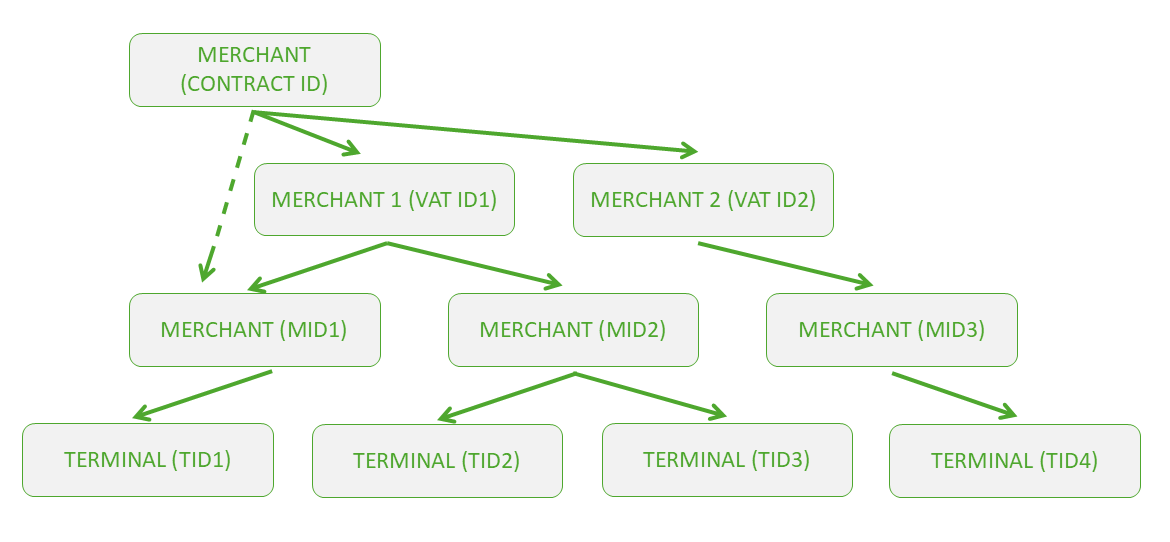
CONTRACT_ID is optional and only used in case lower level tiers require aggregation; VAT_ID is optional and only used in case lower level tiers require aggregation; MID is the lowest and most common merchant organization structure tier; TIDs are allocated on a MID level.
Merchant structure is always assigned and edited by the acquiring entity. However, merchant’s 3rd party application backend should be capable of retrieving this structure from ToM backend, track the potential changes in it and be capable of deciding which TID should be assigned during the registration process.
ToM API documentation lists several merchant level functions that may be used for terminal management, however a suggested function for retrieving current merchant terminal structure is POST /api/v1/terminals/search.
Request Parameters
Complete list of function request elements is available in ToM API specification (https://sandbox-wl-emea.softpos.eu/swagger-ui/index.html?configUrl=/v3/api-docs/swagger-config#/Terminals/search_8). Tables below summarize most important parameters and function filters.
| Parameter | Description | Type | Condition |
|---|---|---|---|
| page | Integer defining a zero-based page index (default is 0) | Integer | Optional |
| size | Integer defining number of items to be returned in a single page (default is 10) | Integer | Optional |
| sort | String defining response list sorting criteria in the format: property,(asc|desc). Default order is ascending. Multiple sort criteria are supported | String | Optional |
Request Body
| Parameter | Description | Type | Condition |
|---|---|---|---|
| contract_id | Merchant tier level identifier or combination of identifiers defining which part of terminal structure should be returned | String | Optional |
| vat_id | Merchant tier level identifier or combination of identifiers defining which part of terminal structure should be returned | String | Optional |
| mid | Merchant tier level identifier or combination of identifiers defining which part of terminal structure should be returned | String | Optional |
| tid | Terminal identifier. Used when current terminal details need to be checked | String | Optional |
| connected | Terminal assignment status: true – terminal is linked to a device; false – terminal is unassigned and available | Boolean | Optional |
| disabled | Flag indicating whether the terminal is temporarily restricted from performing operations | Boolean | Optional |
Response Parameters
Complete list of response elements is available in ToM API specification (https://sandbox-wl-emea.softpos.eu/swagger-ui/index.html?configUrl=/v3/api-docs/swagger-config#/Terminals/search_8). Table below summarizes most important fields.
| Parameter | Description | Type | Condition |
|---|---|---|---|
| id | Terminal UUID stored in the ToM backend | String (UUID) | Mandatory |
| external_id | 3rd party terminal identifier (if assigned and present) | String | Optional |
| tid | ToM backend recognized active TID selected for assignment | String | Mandatory |
| mid | ToM backend recognized MID corresponding to the selected TID | String | Mandatory |
Locking a terminal selected for registration
The decision on the TID selected for registration should be followed by the generation of a registration token. Creating a registration token moves the TID to ‘locked’ status. It means that throughout the registration token validity, TID cannot be manually registered in standalone mode.
ToM API function for the registration token generation operation is POST /api/v1/terminals/{id}/registration-token, where id is a terminal UUID stored in ToM backend.
Important note: registration token’s expiry timestamp may be extended by calling POST /api/v1/terminals/{id}/registration-token/refresh ToM API function. This operation maintains previous token value and new validity timestamp is returned in the response.
Request Parameters
Complete list of request elements is available in ToM API specification (https://sandbox-wl-emea.softpos.eu/swagger-ui/index.html?configUrl=/v3/api-docs/swagger-config#/Terminals%20Registrations/registrationToken). Table below summarizes most important fields.
| Parameter | Description | Type | Condition |
|---|---|---|---|
| id | Terminal UUID stored in the ToM backend | String (UUID) | Mandatory |
Request Body
| Parameter | Description | Type | Condition |
|---|---|---|---|
| Optional parameter allowing to provide an email address of the user who should receive a welcome email containing the registration token in QR-code format; an empty body should be used when no user notification is required | String | Optional |
Response Parameters
Complete list of response elements is available in ToM API specification (https://sandbox-wl-emea.softpos.eu/swagger-ui/index.html?configUrl=/v3/api-docs/swagger-config#/Terminals%20Registrations/registrationToken). Table below summarizes most important fields.
| Parameter | Description | Type | Condition |
|---|---|---|---|
| token | Generated registration token to be used in the Tap on Mobile application for registering the selected TID | String | Mandatory |
| expiry_date | Registration token expiry timestamp | String (timestamp) | Mandatory |
| created | Registration token creation timestamp |
Related Resources
Worldline Payment Interface for transactions
Full API specification
Terminal registration guide
Test cards for sandbox testing
| String (timestamp) | Mandatory |