Worldline Intent interfaces
Introduction
This documentation is intended for third-party application providers who wish to develop business applications interacting with Worldline Tap on Mobile application to provide contactless card payment functionality and covers the supplementary management processes which currently are built around the integrated registration functions.
High level architecture and interfaces view including Worldline Payment Interface and Tap on Mobile Management Interface flows is presented below.
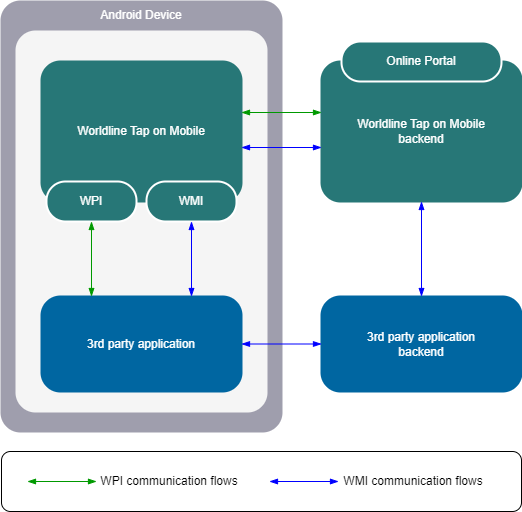
To interact with a payment application, Tap on Mobile offers intent based interface for easy and fast integration. A 3rd party application is used to extend and control the business flow for the desired use cases. The payment application is displayed only in the event of a transaction. Tap on Mobile is using Android Intents mechanism that allows to communicate between components of an Android app, such as Activities, Services, Broadcast Receivers, and Content Providers. An Intent object is used to describe what an app component should do, including the action to be performed and the data to be used.
Intent usage in Android for application integration can be broadly categorized into two types:
- Explicit Intents: These intents are used to launch a specific component within the same app. The target component is specified explicitly in the intent. For example, starting an Activity from another Activity within the same app.
- Implicit Intents: These intents do not specify the target component directly. Instead, they declare a general action to be performed and let Android resolve the target component based on the information provided in the intent. For example, sending an email or opening a web page. Softpos API is the implementation of this type of intent.
Intents can also carry data in the form of key-value pairs, called Extras, which can be used to pass data between components. By using intents, apps can delegate tasks to other components and take advantage of the existing Android framework to perform common actions.
More information about Intents can be found in native Google Android documentation.
Tap on Mobile provides a set of intents that developers can use to build apps that work with the interface. The following intents are available:
- WPI Financial operations - offers the possibility of performing a financial operation: payment, reversal, refund, credit
- WPI Information operations – offers the ability to check the status of the last performed transaction
- WMI - provides a set of management functions necessary to register and unregister the application, as well as to check its current status
Notice: To fully utilize WPI's capabilities, backend-to-backend integration may also be required. This enables full remote management of the available terminals.
Wordline Management Interface (WMI)
Intent: com.worldline.management.action.PROCESS_OPERATION
The Tap on Mobile application, after installation and before first use, requires completing a registration process, which is intended to link the installed application with a specific payment terminal defined in the payment system.
The registration process can be carried out manually in the application by the user or in an integrated mode using the functions available within the Wordline Management Interface intent.
WMI offers the following services:
| Service type | Description |
|---|---|
| WMI_SVC_CHECK_STATUS | Service type for checking current Tap on Mobile application status |
| WMI_SVC_REGISTER | Service type for initiating the terminal enrollment sequence |
| WMI_SVC_AUTH_UNREGISTER | Service type for unregistering the terminal by the 3rd party application package used previously for enrollment |
WPI Financial operations
Intent: com.worldline.payment.action.PROCESS_TRANSACTION
The Wordline Payment Interface – Financial Operations intent, as the name suggests, groups the services responsible for carrying out financial transactions.
It offers the following services:
| Service type | Description |
|---|---|
| WPI_SVC_PAYMENT | Service type for a purchase |
| WPI_SVC_CANCEL_PAYMENT | Service type for a reversal of a previous transaction |
| WPI_SVC_REFUND | Service type for a refund of a previous transaction or for credit operation |
WPI Information Operations
Intent: com.worldline.payment.action.PROCESS_INFORMATION
The Wordline Payment Interface – Information Operationd intent groups additional informational functions.
It offers the following services:
| Service type | Description |
|---|---|
| WPI_SVC_LAST_TRANSACTION | Used to return the last (previous) transaction result. In case of the last payment transaction response is not known any more, it can be requested by this service. It will return the last financial transaction response independent of the result, failed or success. This is a recovery feature as the payment solution will remember the last SESSION_ID as well as corresponding transaction response. |
Versioning
Wordline Payment Interface (WPI)
The WPI uses versioning with the format Y.X (e.g., 1.0, 2.1) to track and manage different releases of our software.
- Y (Major Version): Signifies a significant milestone with potential breaking changes. Example: a version 2.x request cannot be used with version 1.x.
- X (Minor Version): Represents a release with new features or improvements that should be backward compatible within the same major version. But there are exceptions to this - version 2.2 is not fully compatible with version 2.1
The published version of the documentation describes WPI version 2.2.
Tap on Mobile application versions supports following WPI versions:
| Tap on Mobile Version | WPI 1.0 | WPI 2.0 | WPI 2.1 | WPI 2.2 |
|---|---|---|---|---|
| 2.1.25 - 2.1.29 | YES | - | - | - |
| 2.1.30 - 2.1.33 | YES | YES | - | - |
| 2.1.34 | YES | YES | Partially supported in terms of DCC | - |
| 4.1.35 | YES | YES | YES | - |
| Since 5.4.0 | YES | YES | YES | YES |
NOTICE: In the first quarter of 2025, version 1.0 of WPI will be phased out.
Wordline Managment Interface (WPI)
WMI is not versioned. Full downward compatibility is maintained as new functionality is added.
Before you start integration
Before starting the development certain preconditions need to be met, i.e.:
- 3rd party app developers should have an access to sandbox Worldline Tap on Mobile application;
- 3rd party app package needs to be whitelisted in sandbox environment;
- Organization structure for test merchant should be configured in sandbox environment;
- OAuth2 access credentials for ToM backend need to be provisioned and exchanged;
Tap on Mobile package names (Worldline Acquiring entities use different mobile application package names):
| Acquirer | Android Package name | Region of availability |
|---|---|---|
| Worldline EU | eu.softpos.softposwrapper.wl | European Union |
| Worldline CH | eu.softpos.softposwrapper.wl | Switzerland |
| CAWL | eu.softpos.softposwrapper.cawl | France |
| Crédit Agricole | eu.softpos.softposwrapper.cawl | France |
| Payone | eu.softpos.softposwrapper.payone | Austria; Germany |
| KB Smart | eu.softpos.softposwrapper.kb | Czechia |
| ANZ Worldline | eu.softpos.softposwrapper.wlanz | Australia |
| ING Italy | eu.softpos.softposwrapper.ingit | Italy |
Security remarks
Android permissions and settings
As default – the required Android permissions for running the application are set during the installation and registration process. But if the device works under MDM (or similar) types of management software, make sure that required permissions are set up properly.
List of required permissions used (may be extended in future versions of the application):
- NFC (exclusive access to read contactless cards)
- CAMERA (block the screen in case of PIN providing + entropy RNG seeding)
- GEOLOCATION_CHECK + ACCESS_FINE_LOCATION (verification of the transaction's location)
- INTERNET (communication with the host)
- ACCESS_NETWORK_STATE (verification of the network state)
- ACCESSIBILITY_SERVICE (recognizing overlapping apps)
Some vendors may have their own settings that may prevent application running (i.e. Xiaomi application popup windows blockade). Please consult the acquirer in case of problems with proper parameterization of the devices.
Device cannot have debug mode turned on or be rooted (works at standard user settings) – otherwise the error must be reported.
Device has also proper time and date set up. Best to be synchronized with any time server or GSM operator time. If time differs from the real one, then communication with the server will be refused.
System baseline and configuration
Devices running the application should be compliant with Google guidelines Please ensure that:
- Device is equipped with Hardware Backed Key-Store (aka “safe memory”) – most modern devices after 2018 should have such element
- Device supports GMS services and up-to-date Google Play services are installed
- Android version is still supported, and all newest security patches are installed
- In case of controlled/closed networks – the connection to the server and to Google service servers are turned on/allowed at firewall.
- Device has valid Google certificates uploaded
- Integrity API confirms that device can be used as payment solution
Secure installation of payment app from the store
The softpos application is distributed via official Google Store. (https://play.google.com/) New version of the app issued is provided by dedicated URLs (consult with the acquirer, to have proper one) and available in official app store application. Please use the last available versions, having the newest security fixes and new functionalities.
Application has own update policy, that may be set-up by acquirers at any time. It will force the application to update during next start.
Certifications and security settings will be uploaded during first registration of the device. Refer to registration procedure in your application manual.
Application doesn’t need any special treatment as for the initial parameterization (the required permissions will be set-up during registration process – with step by step process). It is not possible to turn off any security settings from the application level. All required configuration is built-in to the application package, and only limited number of changeable parameters are uploaded at the start of the application.
Solution is secured by strong cryptography – all the data exchange, processes, payment related operations are handled within the defined security context. Certificates and keys distribution is done automatically via registration process. It is possible to unregister the device from backend level (via portal), which means removal of all cryptography materials and returning the application to initial state. Repeating of the registration process is then needed to reinitiate secure channels to the backend.
Application has own mechanisms to automatically update old certificates, so if it is regularly used, there’s no need to do any special operations even if the cryptographic certificates are changed at backend level.
Any manipulation of the data managed by the app and tries to break security measures inside the application or hardware keystore may lead to blacklist the device and unability to continue the payment operations on it.
If payment application is to be used with any 3rd party application, then make sure it is also installed securely (i.e. via Google Play) or in controlled environments (i.e. inside MDM managed networks). Only intent handling permissions is needed to initiate the operations with payment application.
If your application works in such called “overlay mode” (overlapping the other apps of the screen when running), it may be recognized by the payment app and the operations will be terminated. Please consult with the acquirer if such situation occurs.
3rd party application shouldn’t require perimissions higher than regular user of the device. Rooted devices will be recognized by payment application and you may not continue the operations.
NFC usage restrictions
If the 3rd party application uses the NFC interface, it may collide with the need to obtain exclusive access by the payment application. Due to regulatory and security reasons, NFC reader must be exclusively locked by payment application – and it is released after finishing the payment operation. 3rd party app must consider such behavior and release the NFC access before payment operation is made.
Tap on Mobile operation modes
Due to regulatory constraints, the Tap on Mobile application uses a single, common distribution channel: the Google Play Store. This means that all offered operation modes must be consistently supported within the same product. Therefore, it is important to understand the dependencies between the relevant operation modes (i.e. standalone and integrated authentication). The Tap on Mobile application logic checks and relies on the selected operation mode.
Standalone operation mode
In standalone operation mode, the application has been manually enrolled by the user via the built-in UI registration options. This mode requires the user to establish a 4-digit application access code, which is then required for any authentication operations. If supported by the current product configuration, the access code can be replaced by device biometric options.
Standalone operation mode is blocked for user when:
- application was registered using WMI,
- application was registered manually and any financial operation was performed using WPI. This rule can be switched off using merchant configuration, but this is not recommended. In this case, after launching the application, a dedicated screen will inform the user that it is running in integrated mode.
Integrated operation mode
The integrated operation mode encompasses all use cases in which the application is enrolled using WMI. WPI functions are also supported for terminals using this mode. However, there are several crucial rules for the proper usage and understanding of integrated mode, i.e.:
-
The ToM application registered in integrated mode cannot be accessed from the application GUI (except the login screen when launched manually);
-
After registration, the ToM application is responsible for its own authentication and session validity, so the login/authentication function does not need to be covered by a third-party application;
-
During registration in integrated mode, the ToM application checks the package name of the third-party application being registered and binds to it;
-
While the ToM application is exclusively bound to a certain third-party application package name, all WPI and selected WMI requests incoming from other application packages will be rejected with a dedicated error condition code.
Notice: The WMI_SVC_REGISTER service is exempt from this rule, allowing the ToM application to be automatically redirected to another third-party application package running on the same device.
To allow assessing which action is required, WMI offers a dedicated function to retrieve the current ToM application status. It is strongly recommended to retrieve this information outside of payment acceptance context.
Operation modes summary
This section outlines ToM application behavior for selected functions in available operation modes.
| Standalone operation mode (manual registration) | Integrated operation mode (WMI registration) | |
|---|---|---|
| Manual desktop application launch | - ToM login screen (for unauthenticated app) - ToM home screen (for authenticated app) | - ToM login screen - dedicated screen informing that the application runs in an integrated mode |
| WPI functions | Supported (for whitelisted package names) | Supported only for 3rd party application package name that registered the ToM application |
| ToM application login upon calling WPI functions | - [global behavior] seamless – ToM app uses 4 digit access code set during registration or during 1st login activity; - [optional behavior upon request] ToM login screen and manual provision of 4 digit access code every time the authentication is required | - Not applicable; handled internally by the ToM application |
| Manual desktop launch after calling WPI functions | - [global behavior]: dedicated screen informing the user that ToM application is running in an integrate mode - [optional behavior upon request]: ToM login screen (for unauthenticated app) ToM home screen (for authenticated app) | - dedicated screen informing that the application runs in an integrated mode |
| Unregistration capabilities | No WPI requests processed: - Unsubscribe option available from login screen (for unauthenticated app); - Unregister function in app settings (for authenticated app); - Unregistering from merchant portal; WPI requests already processed: - Unsubscribe option available from a dedicated screen informing the user that ToM application is running in an integrated mode; - Unregistering from merchant portal; | - WMI_SVC_AUTH_UNREGISTER function; - WMI_SVC_REGISTER function (available to all 3rd party packages and purging the previous registration process); - Unsubscribe option available from login screen (for unauthenticated app); - Unregistering from merchant portal; |
Implementation scaling
The following chapters describe core processes such as checking application status and the sequences required for registering and unregistering terminals via specific WMI service types. Communication between the third-party application and Tap on Mobile is handled through Android Intents and structured JSON data payloads, including defined error conditions and response statuses.
Tap on Mobile (ToM) operates in two main modes: standalone and integrated. Based on operating modes and merchant hierarchical structures, we can divide implementation scalability into small, medium, and large implementations based on the complexity of the requirements.
Small-scale
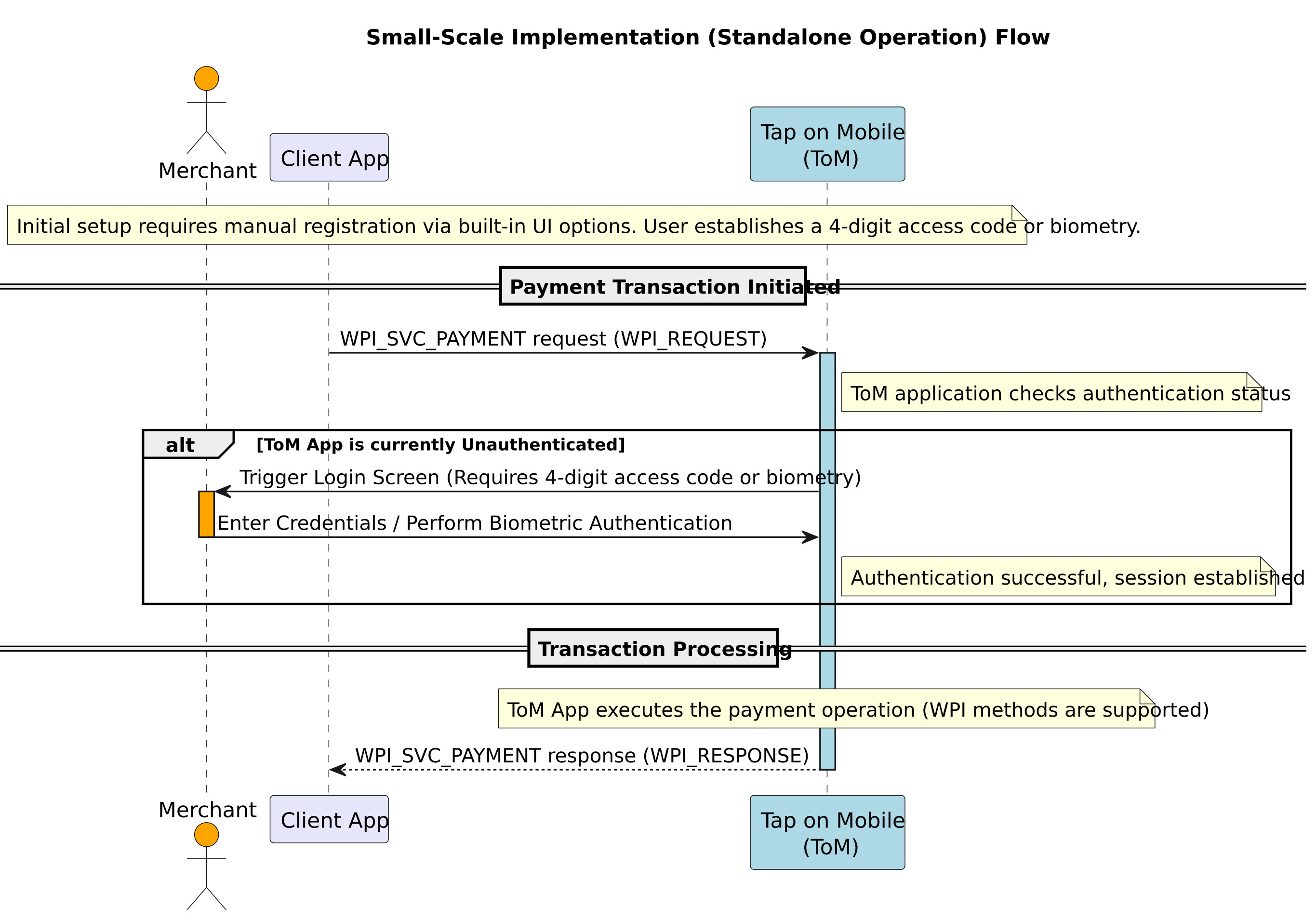
A small-scale implementation applies to individual terminals (TIDs) or simple MIDs, and utilizes the Standalone operation mode, which is characterized by manual enrollment and reliance on the user to handle authentication directly through the Tap on Mobile (ToM) application's built-in user interface.
A small-scale implementation can be devided into following phases:
- Enrollment and Authentication: Enrollment is performed manually by the user using built-in UI registration options. This mode requires establishing a 4-digit application access code, which is then required for authentication operations, or biometry options if supported by the product configuration.
- WPI Support: Using standalone mode supports Worldline Payment Interface (WPI) methods. Any WPI function call to an unauthenticated ToM application will trigger a login screen (requiring the 4-digit access code or biometry).
For Worldline in the Client App there is defined dynamic properties api.intent.passcode which, when set to TRUE, enables automatic login. It works as follows:
- When logging into the application for the first time, the access code is saved in the application itself.
- When the intent is triggered, if the access code is already saved, the Client application logs in automatically, and the Merchant no longer needs to enter it.
- Integration: This implementation requires little to no direct integration with the Tap on Mobile backend API, as management (registration/authentication) is handled internally by the ToM application's UI.
The diagram below illustrates the flow for initiating a transaction (WPI) in the Standalone operation mode, focusing on the critical manual authentication step required when the ToM application is unauthenticated.
Medium-scale
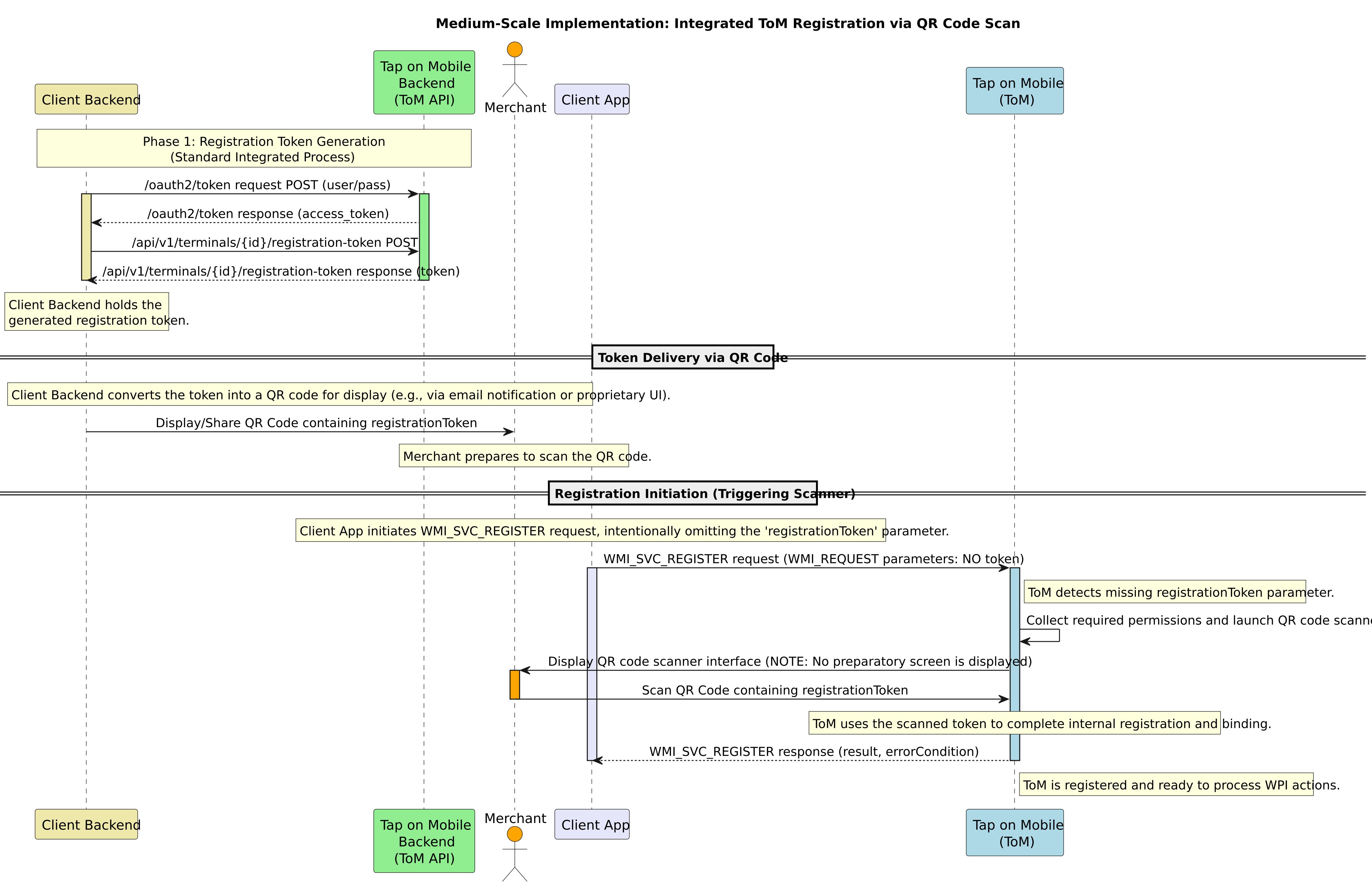
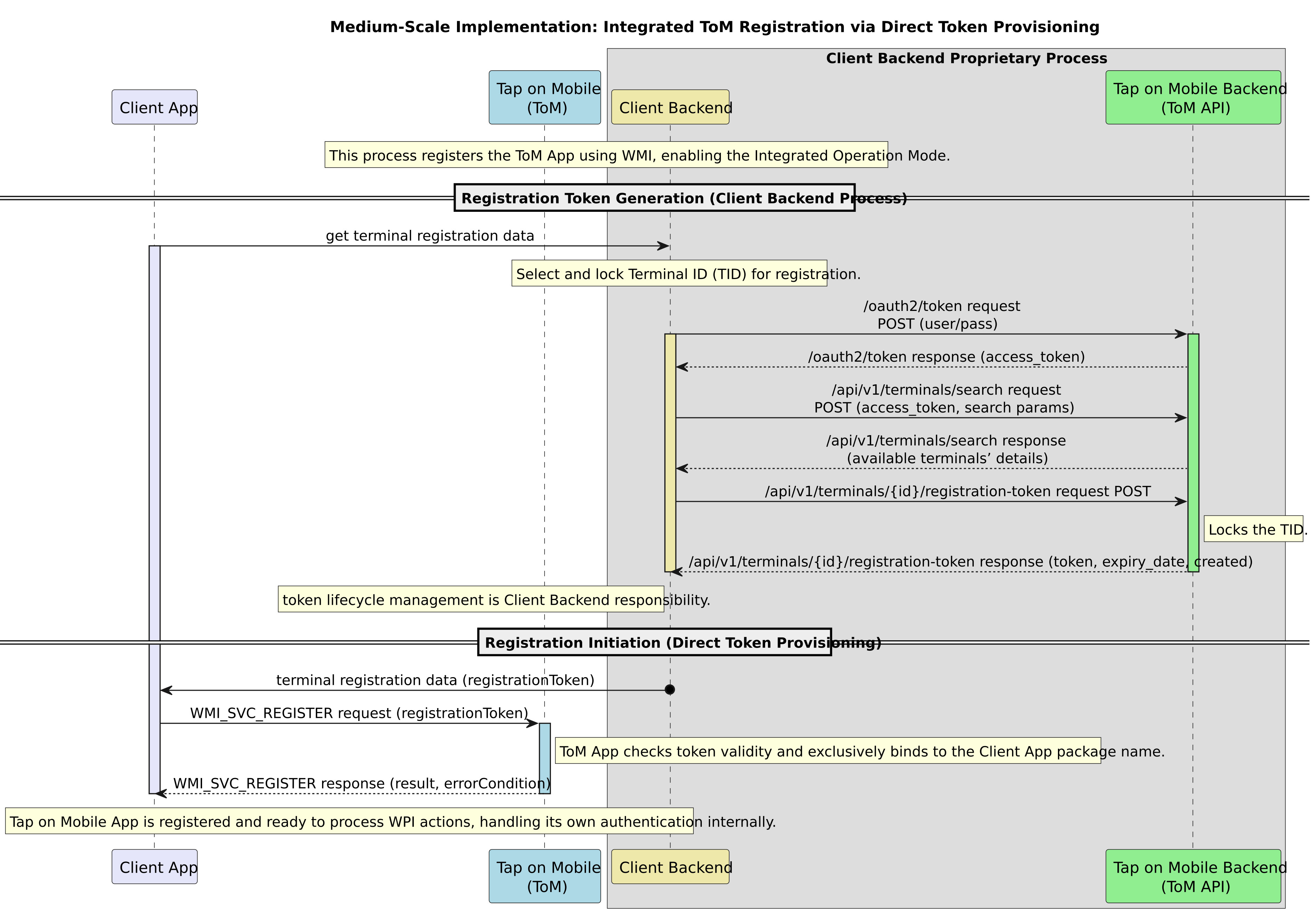
A medium-scale implementation relies on the ToM integrated operation mode, and can be completed in two ways, using QR Code Scanning or Direct Token Provisioning (Automated Scale). In both ways, to generate a registrationToken that will later be sent to the Client App, the Client Backend performs the same steps as Backend authentication and Terminal Locking.
Backend Authentication: The Client Backend obtains an access_token from the Tap on Mobile (ToM) backend API using OAuth2 authentication. Terminal Locking: The Client Backend retrieves the merchant's terminal structure (using /api/v1/terminals/search) and selects a Terminal ID (TID) to register it, then calls the API function POST /api/v1/terminals/{id}/registration-token to lock the TID and generate a unique registrationToken.
Then, depending on the implementation method, the following steps are performed:
Implementation Using QR Code Scanning
- The Backend needs to display this token, potentially encoded in a QR-code format, for the user to access.
(Note: The API function POST /api/v1/terminals/{id}/registration-token includes an optional email parameter to share the registrationToken in QR-code format via email, but this is an optional user notification and not the standard registration mechanism) - Registration Request (Missing Token): The Client App initiates the terminal registration sequence using WMI_SVC_REGISTER without providing the registrationToken parameter in the WMI_REQUEST.
- ToM App Response: In this scenario, because the registrationToken parameter is not present, the Tap on Mobile (ToM) application will automatically launch a QR code scanner to collect the required permissions and scan the registrationToken.
- Merchant Action: The Merchant then scans the QR code containing the token, allowing the ToM application to complete the registration process.
- Tap on Mobile is registerd and ready to precess WPI actions.
The diagram below illustrates the flow Medius-scale implementation via QR Code scans.
Direct Token Provisioning
- Token Delivery (Direct): The Client Backend transmits the generated registrationToken (which is a mandatory request parameter) to the Client App running on the device
- Terminal Registration: The Client App initiates the enrollment sequence using the Worldline Management Interface (WMI) service WMI_SVC_REGISTER, passing the received registrationToken in the WMI_REQUEST parameters.
- ToM App Response: In this scenario, because the registrationToken parameter is not present, the Tap on Mobile (ToM) application will automatically launch a QR code scanner to collect the required permissions and scan the registrationToken.
- Merchant Action: The Merchant then scans the QR code containing the token, allowing the ToM application to complete the registration process.
- Tap on Mobile is registerd and ready to precess WPI actions.
In this method terminal management is centralized in the backend, and registration is initiated programmatically via WMI.
The diagram below illustrates the flow Medius-scale implementation via QR Code scans
Large-scale
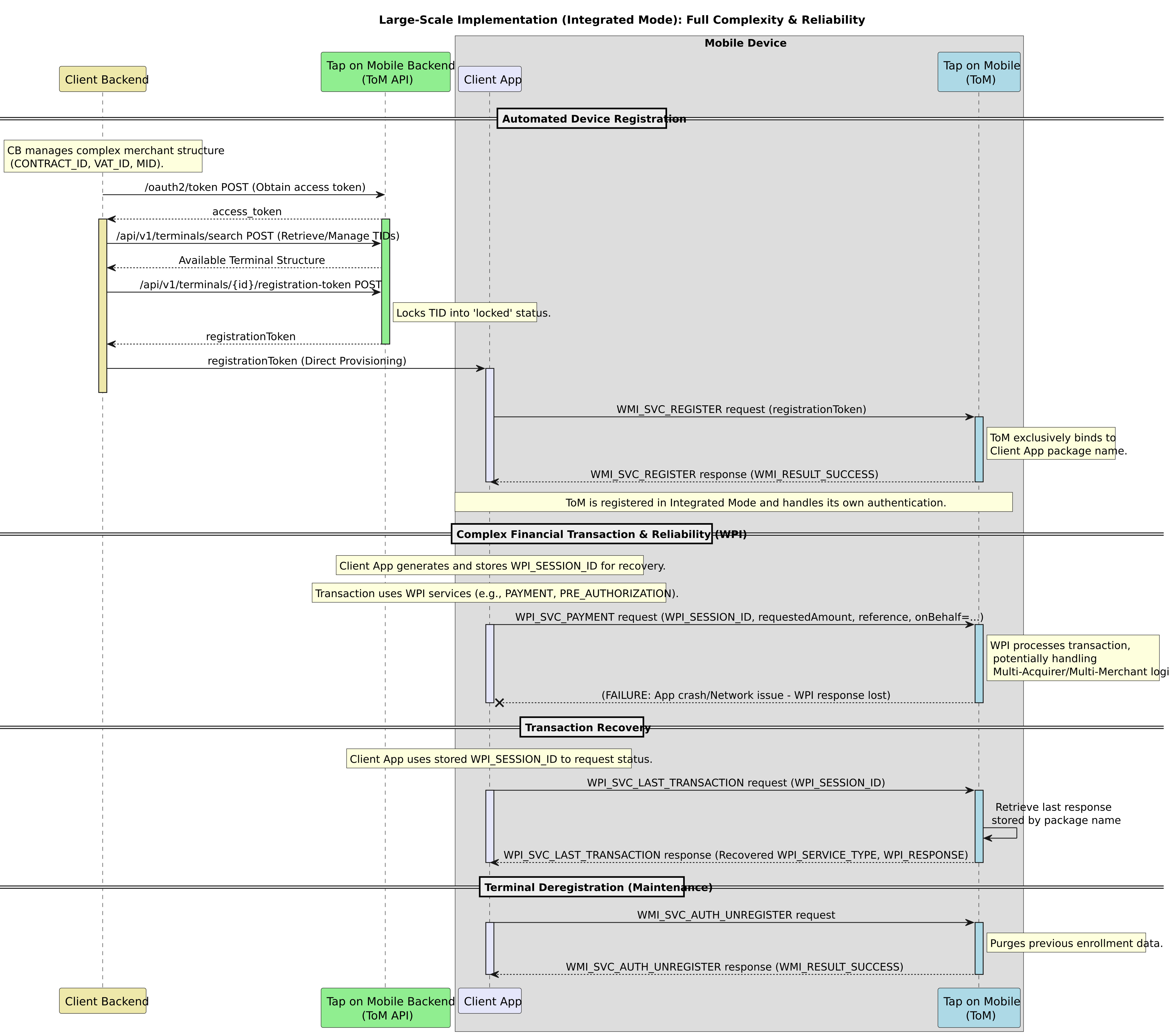
Implementation for a large-scale deployment using the Integrated Operation Mode is achieved through detailed backend integration, primarily revolving around the Integrated ToM registration process and comprehensive usage of the Worldline Payment Interface (WPI).
The integrated mode is mandatory for scaling, as it automates terminal management and bypasses the limitations of manual setup.
Large-scale implementation is achieved as follows:
1. Backend Integration for Centralized Management
Large-scale implementation necessitates direct integration between the 3rd party application backend and the Tap on Mobile (ToM) backend API. This integration covers the following mandatory areas:
- Authentication (OAuth2): The backend must handle OAuth2 authentication to obtain access tokens. These tokens are required to authenticate and authorize requests to protected resources within the ToM API. Storing these credentials directly in the mobile application is not allowed.
- Terminal Structure Retrieval: The backend must retrieve and manage the merchant’s complete terminal organization structure (including potentially hierarchical tiers like
CONTRACT_ID,VAT_ID, andMID) using the functionPOST /api/v1/terminals/search. This allows the system to track potential changes and make decisions on which Terminal ID (TID) to assign during registration. - Terminal Locking and Token Generation: To ensure controlled deployment, the backend must lock a free terminal selected for registration by calling the API function
POST /api/v1/terminals/\{id}/registration-token. This action generates a uniqueregistrationTokenand moves the TID to a 'locked' status, ensuring the TID cannot be manually registered in standalone mode during the token's validity.
2. Device Enrollment and Binding
Once the backend generates the registrationToken, the Client App uses the Worldline Management Interface (WMI) to register the device:
- Token Delivery: The Client Backend delivers the generated
registrationTokento the Client App. - WMI Registration: The Client App initiates the terminal enrollment sequence using the service type
WMI_SVC_REGISTER, passing theregistrationToken. - Exclusive Binding: During this registration process, the ToM application performs a crucial security check: it checks and exclusively binds to the package name of the registering 3rd party application. This binding ensures that all Worldline Payment Interface (WPI) and most WMI requests originating from other applications on the same device are rejected.
3. Operational Features Enabling Scale and Reliability
The Integrated operation mode provides features essential for running a large, complex network of payment terminals:
- Autonomous Authentication: After successful registration, the ToM application becomes solely responsible for its own authentication and session validity. The 3rd party application is thus relieved of managing user login or authentication functions for transactions.
- WPI Usage: The 3rd party application interacts with the ToM app using WPI function calls (e.g.,
WPI_SVC_PAYMENT) to execute all financial and management use cases, ensuring compatibility across a wide range of devices and payment protocols. - Reliability and Recovery: For maximum reliability in a large network, the business application must store the
WPI_SESSION_IDfor every transaction request. If a transaction fails unexpectedly (e.g., due to an app crash or network error) and the result is unknown, the recovery featureWPI_SVC_LAST_TRANSACTIONmust be used to retrieve the outcome of the previous transaction from the payment solution. - Device Unregistration: Large-scale terminal lifecycle management requires a simple way to decommission devices. This is done programmatically using the WMI service type
WMI_SVC_AUTH_UNREGISTER, which removes the currently assigned TID and purges all previous enrollment data, making the device available for re-registration.
The diagram below illustrates a Large-scale implementation.