WPI - Payment Interface
Interface Structure
WPI is using Intents in Android that are a means of communicating between components of an Android app, such as between Activities, Services, Broadcast Receivers, and Content Providers. An Intent object is used to describe what an app component should do, including the action to be performed and the data to be used.
Intent usage in Android for application integration can be broadly categorized into two types:
- Explicit Intents: These intents are used to launch a specific component within the same app. The target component is specified explicitly in the intent.
- Implicit Intents: These intents do not specify the target component directly. Instead, they declare a general action to be performed and let Android resolve the target component based on the information provided in the intent. WPI is the implementation of this type of intent.
Intents can also carry data in the form of key-value pairs, called Extras, which can be used to pass data between components.
The WPI provides a set of intents that developers can use to build apps that work with the interface:
| Type | Category | Intent | Purpose |
|---|---|---|---|
| Financial | Display Action | com.worldline.payment.action.PROCESS_TRANSACTION | Process a financial transaction |
| Information | Background action | com.worldline.payment.action.PROCESS_INFORMATION | Background management of payment solution specific information |
We have two categories for the Interface:
- Display Actions: These actions start the payment solution that are processing financial transactions or require user interaction (Android intents are used)
- Background Actions: These actions perform background processing that doesn't require user interaction, but sometimes can require user interaction (due to COTS device specification)
Android Intent Implementation
The start of a payment is based on an intent. Each special transaction type has a set of parameters that are mandatory. To test transactions, you can use the Worldline Tap on Mobile Test App.
Here is intent creation code:
    public Intent formatPurchaseRequest(String sessionId, WpiPurchaseRequest req) \{
        String json = GSON.toJson(req);

        Intent intent = new Intent("com.worldline.payment.action.PROCESS_TRANSACTION");
        intent.addFlags(Intent.FLAG_ACTIVITY_REORDER_TO_FRONT);
        intent.putExtra("WPI_SERVICE_TYPE", "WPI_SVC_PAYMENT");
        intent.putExtra("WPI_REQUEST", json);
        intent.putExtra("WPI_VERSION", "2.2");
        intent.putExtra("WPI_SESSION_ID", sessionId);
        intent.putExtra("SHOW_OVERLAY ", false)

        return intent;
    }
Intent contains a set of extras and needs to have FLAG_ACTIVITY_REORDER_TO_FRONT set.
| Extra | Descritpion | Type | Condition |
|---|---|---|---|
| WPI_SERVICE_TYPE | Specify the subtype of action to be executed: - WPI_SVC_PAYMENT - Service type for a purchase - WPI_SVC_CANCEL_PAYMENT - Service type for a reversal of a previous transaction - WPI_SVC_REFUND - Service type for a refund of a previous transaction | String | Mandatory |
| WPI_REQUEST | The request contains JSON structured data that is mandatory for the given service type. The JSON structure is described in the following chapters for each function. | String | Mandatory |
| WPI_VERSION | Used WPI version (current: 2.2) | String | Mandatory |
| WPI_SESSION_ID | Used as an identifier of a WPI exchange (a request/response) between a client application and a payment application. Is used to recover the status of the exchange in case of an unexpected failure. Is provided by the client. The session id: - must be unique - must not be reused for subsequent requests (as soon as the cache is expired this would not be an issue, so it is not necessary to keep track of it but as a general rule a unique random string per request should be used) If an unexpected failure occurs during an exchange, the session ID can be used to allow the client to restore its state and synchronise the exchange status with the payment application. | String | Mandatory |
| SHOW_OVERLAY | The flag controls whether a transparent overlay (false) or a spinner (true) should be displayed at the start of the intent. | Boolean | Optional |
To launch intent registerForActivityResult method should be used. In the response, the intent returns the following data.
| Extra | Descritpion | Type | Condition |
|---|---|---|---|
| WPI_SERVICE_TYPE | Specify the subtype of action to be executed | String | Mandatory |
| WPI_RESPONSE | The response contains JSON structured data processed for the requested service type | String | Mandatory |
| WPI_VERSION | Used WPI version | String | Mandatory |
| WPI_SESSION_ID | Identifier of a WPI exchange provided by the client. | String | Mandatory |
And here is response parsing sample code:
    public WpiPurchaseResponse parsePurchaseResponse(ActivityResult result) \{
        if (result.getResultCode() == Activity.RESULT_CANCELED) \{
            throw new RuntimeException("Intent cancelled.");
        }
        if (result.getResultCode() != Activity.RESULT_OK) \{
            throw new RuntimeException("Invalid result code: " + result.getResultCode());
        }

        Intent intent = result.getData();
        if (intent == null) \{
            throw new RuntimeException("Received intent without bundled data");
        }

        String json = intent.getStringExtra("WPI_RESPONSE");

        WpiPurchaseResponse resp = GSON.fromJson(json, WpiPurchaseResponse.class);
        resp.setSessionId(intent.getStringExtra("WPI_SESSION_ID"));

        return resp;
    }
| Please remember |
|---|
| The important thing to note is that ToM can only handle one intent invocation at a time (of any intent type — it doesn’t matter whether it’s a financial or informational function). Therefore, it is crucial to make the next request only after receiving the response from the previous one. |
<!-- If you want to see what a sample working code looks like, you can use the projects below.
| Programming language | Project |
|---|---|
| Compose | https://gitlab.softpos.eu/samples/wpi-example-compose |
| Flutter | https://gitlab.softpos.eu/samples/wpi-example-flutter |
| Java | https://gitlab.softpos.eu/samples/wpi-example-java |
| Kotlin-compose | https://gitlab.softpos.eu/samples/wpi-example-kotlin-compose |
| Kotlin-XML | https://gitlab.softpos.eu/samples/wpi-example-kotlin-xml |
| --> |
The session id:
- Must be unique
- Must be part of the response
- Must not be reused for subsequent requests In the case of an unexpected failure during an exchange, the session id can be used in order for the client to restore its state and sync the exchange status with the payment application.
Response Extras:
| Extra | Description | Type | Condition |
|---|---|---|---|
WPI_SERVICE_TYPE | Specify the subtype of action to be executed | String | Mandatory |
WPI_RESPONSE | The response contains JSON structure data processed for the requested service type | String | Mandatory |
WPI_VERSION | Used WPI version | String | Mandatory |
WPI_SESSION_ID | Identifier of a WPI exchange provided by the client | String | Mandatory |
/**
 * Code snippet only
 * SaleTransactionRequest and SaleTransactionResponse are not provided - they are simple POJOs
 */
class SaleActivity : AppCompatActivity() {
    val launcher = registerForActivityResult(
        ActivityResultContracts.StartActivityForResult()
    ) { result ->
        result.data?.let { handleTransactionResponse(it) }
    }

    private fun startTransactionIntent(transactionJson: String, serviceType: String) {
        val intent = Intent("com.worldline.payment.action.PROCESS_TRANSACTION")
        // These extras are mandatory whether the intent comes from the payment
        // application or a 3rd party application.
        intent.putExtra("WPI_SERVICE_TYPE", serviceType)
        intent.putExtra("WPI_REQUEST", transactionJson)
        intent.putExtra("WPI_VERSION", "2.2")
        intent.putExtra("WPI_SESSION_ID", currentSession)

        launcher.launch(intent)
    }

    private fun handleTransactionResponse(intent: Intent) {
        val rawJsonResponse = intent.getStringExtra("WPI_RESPONSE")
        // Handle response
    }
}
Important Considerations:
- It is strictly advised to store
WPI_SESSION_IDwithin the business application - No new transaction should be initiated before the result of the previous is known
- If the previous transaction status is unknown to the cash register, last transaction should be used to get it from Tap on Mobile app
Data Dictionary
This chapter describes the data exchange format. All requests and responses use JSON as data exchange format.
| Service Type | Description |
|---|---|
WPI_SVC_PAYMENT | Service type for a purchase |
WPI_SVC_CANCEL_PAYMENT | Service type for a reversal of a previous transaction |
WPI_SVC_REFUND | Service type for a refund of a previous transaction |
Financial operations
Payment
The Service Type for a purchase transaction is WPI_SVC_PAYMENT.
Prerequisites:
- ToM application correctly installed.
- Terminal properly registered (paired with the ToM backend system).
- Transaction parameters (currency, etc.) must be in accordance with the terminal profile.
WPI_REQUEST - list of supported input parameters
In WPI_SVC_PAYMENT, at a minimum, the currency and requested amount are needed. The full list of parameters is described in the table below.
| Field name | Description | Type | Condition |
|---|---|---|---|
| currency | Currency of the amount. Alpha code value is defined in ISO 4217 (e.g. EUR) | String | Mandatory |
| requestedAmount | Total payment amount as minor unit. The fractional digits are evaluated based in the currency. For example, 11.91€ must be sent as 1191 and the currency as EUR. (tip amount is excluded) | Integer | Mandatory |
| tipAmount | The tip amount to be used as minor unit. This amount has the same currency as the transaction amount. For more information check Tipping | Integer | Optional |
| reference | Reference (external transaction id) to be sent to the payment solution for reconciliation Due to the limitation of acquiring systems, only following characters are supported: ('a'..'z', 'A'..'Z', '0'..'9', hex 40 - hex FF) max. length of this field is 30 characters | String | Optional |
| receiptFormat | Transaction confirmation format. The possible options are a set of data in JSON format to build the confirmation, a text-based confirmation, or displaying the transaction confirmation in the application. For more information check Receipt Format | Array | Optional |
| onBehalf | Multi-merchant mode - on behalf transaction flag For more information check Transactions on Behalf | Boolean | Optional – required when transaction should be performed ‘on behalf’ in multi-merchant mode. |
| partnerTid | Multi-merchant mode - partner terminal TID For more information check Transactions on Behalf | String | Conditional |
| partnerMid | Multi-merchant mode - partner terminal MID For more information check Transactions on Behalf | String | Conditional |
| partnerTerminalUuid | Multi-merchant mode - partner terminal UUID For more information check Transactions on Behalf | String (UUID) | Conditional |
| partnerTerminalExtId | Multi-merchant mode - partner terminal external Id For more information check Transactions on Behalf | String | Conditional |
| checkoutId | Checkout identifier For more information check Checkouts | String (UUID) | Optional – required when merchant operates under acquirer configured with checkout verification. |
WPI_RESPONSE - list of supported output parameters
| Field name | Description | Type | Condition |
|---|---|---|---|
| result | Result of the transaction: - WPI_RESULT_SUCCESS In case of successful transaction- WPI_RESULT_FAILURE In case of failed transaction | String | Mandatory |
| errorCondition | Specific error reason For more information check WPI Error codes | String | Mandatory |
| remark | Terminal / transaction specific message for detailed error descriptions. Text provided by payment app. | String | Conditional – only for NOT successful transaction |
| actionCode | Specific action to be performed by the business application (always returned WPI_ACTION_CODE_NONE) | String | Conditional – only for successful transaction |
| timestamp | Date and time of the transaction, indicated by the acquirer. Format according to ISO 8601 | String (ISO 8601 | Conditional – only for successful transaction |
| currency | Currency code of the transaction. Alpha code value defined in ISO 4217 e.g. EUR | String | Conditional – only for successful transaction |
| authorizedAmount | Amount of the transaction. The fraction is taken from the currency code. Example: Currency = EUR requestedAmount = 3190 => 31,90 € | Integer | Conditional – only for successful transaction |
| brandName | Brand name of used payment method For more information check Brand Name | String | Conditional – only for successful transaction |
| customerLanguage | The merchant’s default language (set in the merchant’s data) Format according to ISO 630-1 (alpha-2 code) | String | Conditional – only for successful transaction |
| applicationIdentifier | Payment card application identifier dependent on the used card e.g. for MasterCard A00000041010 | String | Conditional – only for successful transaction in which a payment card was used |
| applicationLabel | Payment card application label, depending on the used card e.g. MasterCard DEBIT | String | Conditional – only for successful transaction in which a payment card was used |
| receipt | Details for the receipt. For more information check Receipt Format | Array | Conditional: - always present for successful transactions - always present if card was tapped |
| paymentSolutionReference | Transaction specific and unique identification (format: UUID) | String (UUID) | Conditional - always present for successful transactions - optional for failed transactions |
| reference | Reference (external transaction id) - set based on the value of the field with the same name sent in the request | String | Optional - presented if provided in the request |
| merchantIdentifier | Merchant unique identifier (MID) | String | Mandatory |
| terminalIdentifier | Terminal unique identifier (MID) | String | Mandatory |
| tipAmount | The tip amount added to authorisation amount as minor unit. This amount has the same currency as the transaction amount. The fraction is taken from the currency code. | Integer | Conditional - in case of tip is active and entered by the cardholder during transaction processing or provided in the request |
| dccOffered | True - in case of DCC is active and DCC selection was shown towards the cardholder | Boolean | Conditional - in case of DCC is active and DCC selection was shown towards the cardholder |
| dccUsed | True - in case of DCC was selected by the cardholder | Boolean | Conditional - in case of DCC was selected by the cardholder |
| dccAmount | Cardholder amount (Amount in cardholder currency | Integer | Conditional - in case of DCC is active and the cardholder has selected his own currency |
| dccCurrency | Cardholder currency | String | Conditional - in case of DCC is active and the cardholder has selected his own currency |
| dccExchangeRate | Used exchange rate | String | Conditional - in case of DCC is active and the cardholder has selected his own currency |
| cardholderVerificationMethod | Cardholder verification method For more information check Cardholder Verification Method | String Conditional - in case of successful transaction | |
| cardDataInput | The card data input method: - WPI_CARD_DATA_INPUT_PROXIMITY_ICC - for card transactions- WPI_CARD_DATA_INPUT_ALTERNATIVE_PAYMENT_METHOD - for BLIK and APM transactions | String | Conditional - in case of successful transaction |
| onBehalf | Inform if transaction was made on behalf of partner merchant – on partner terminal | Boolean | Conditional - mandatory for transaction performed on-behalf |
| terminalIdentifierLong | Terminal identifier built as (Platform Identifier)-(Merchant Identifier)-(Platform Terminal identifier) | String | Mandatory |
Refund and Credit
The Service Type WPI_SVC_REFUND can be use to perform following transactions.
- Refund of existing transaction
Refunds are issued to the customer's card (a card tap is required) for an amount equal to or less than the original transaction amount. APM/Blik transactions are an exception, as the refund is always issued for the full amount of the original transaction. At least the currency, requested amount and payment solution reference (for refunding a card transaction) are needed for a refund. - Credit custromer
For credit at minimum the currency, requestedAmount.
Prerequisites:
- ToM application correctly installed.
- Terminal properly registered (paired with the ToM backend system).
- Transaction parameters (currency, etc.) must be in accordance with the terminal profile.
WPI_REQUEST - list of supported input parameters
| Field name | Description | Type | Condition |
|---|---|---|---|
| currency | Currency of the amount. Alpha code value defined in ISO 4217 (e.g. EUR) | String | Mandatory |
| requestedAmount | Total refund amount as minor unit. The fractional digits are evaluated based in the currency. For example, 11.91€ must be sent as 1191 and the currency as EUR. Must be equal to or less than the original transaction amount. | Integer | Optional - mandatory for credit and card transaction refund |
| paymentSolutionReference | The UUID of the transaction for which the refund will be executed. | String(UUID) | Optional - mandatory for refund |
| reference | Reference (external transaction id) to be send to the payment solution for reconciliation Due to the limitation of acquiring systems, only following characters are supported: ('a'..'z', 'A'..'Z', '0'..'9', hex 40 - hex FF) max. length of this field is 30 characters | String | Optional |
| receiptFormat | Transaction confirmation format. The possible options are a set of data in JSON format to build the confirmation, a text-based confirmation, or displaying the transaction confirmation in the application. For more information check Receipt Format | Array | Optional |
| onBehalf | Multi-merchant mode - on behalf transaction flag For more information check Transactions on Behalf | Boolean | Optional – required when transaction should be performed ‘on behalf’ in multi-merchant mode. |
| partnerTid | Multi-merchant mode - partner terminal TID For more information check Transactions on Behalf | String | Conditional |
| partnerMid | Multi-merchant mode - partner terminal MID For more information check Transactions on Behalf | String | Conditional |
| partnerTerminalUuid | Multi-merchant mode - partner terminal UUID For more information check Transactions on Behalf | String (UUID) | Conditional |
| partnerTerminalExtId | Multi-merchant mode - partner terminal external Id For more information check Transactions on Behalf | String | Conditional |
| checkoutId | Checkout identifier For more information check Checkouts | String (UUID) | Optional – required when merchant operates under acquirer configured with checkout verification. |
WPI_RESPONSE - list of supported output parameters
| Field name | Description | Type | Condition |
|---|---|---|---|
| result | Result of the transaction: - WPI_RESULT_SUCCESS In case of successful transaction- WPI_RESULT_FAILURE In case of failed transaction | String | Mandatory |
| errorCondition | Specific error reason For more information check WPI Error codes | String | Mandatory |
| remark | Terminal / transaction specific message for detailed error descriptions. Text provided by payment app. | String | Conditional – only for NOT successful transaction |
| actionCode | Specific action to be performed by the business application(always returned WPI_ACTION_CODE_NONE) | String | Conditional – only for successful transaction |
| timestamp | Date and time of the transaction, indicated by the acquirer. Format according to ISO 8601 | String (ISO 8601) | Conditional – only for successful transaction |
| currency | Currency code of the transaction. Alpha code value defined in ISO 4217 e.g. EUR | String | Conditional – only for successful transaction |
| authorizedAmount | Amount of the transaction. The fraction is taken from the currency code. Example: Currency = EUR requestedAmount = 3190 => 31,90 € | Integer | Conditional – only for successful transaction |
| brandName | Brand name of used payment method For more information check Brand Name | String | Conditional – only for successful transaction |
| customerLanguage | The merchant’s default language (set in the merchant’s data) Format according to ISO 630-1 (alpha-2 code) | String | Conditional – only for successful transaction |
| applicationIdentifier | Payment card application identifier dependent on the used card e.g. for MasterCard A00000041010 | String | Conditional – only for successful transaction in which a payment card was used |
| applicationLabel | Payment card application label, depending on the used card e.g. MasterCard DEBIT | String | Conditional – only for successful transaction in which a payment card was used |
| receipt | Details for the receipt. For more information check Receipt Format | Array | Conditional: - always present for successful transactions - always present if card was tapped |
| paymentSolutionReference | Transaction specific and unique identification (format: UUID) | String (UUID) | Conditional - always present for successful transactions - optional for failed transactions |
| reference | Reference (external transaction id) - set based on the value of the field with the same name sent in the request | String | Optional - presented if provided in the request |
| merchantIdentifier | Merchant unique identifier (MID) | String | Mandatory |
| terminalIdentifier | Terminal unique identifier (MID) | String | Mandatory |
| dccOffered | True - in case of DCC is active and DCC selection was shown towards the cardholder | Boolean | Conditional - in case of DCC is active and DCC selection was shown towards the cardholder |
| dccUsed | True - in case of DCC was selected by the cardholder | Boolean | Conditional - in case of DCC was selected by the cardholder |
| dccAmount | Cardholder amount (Amount in cardholder currency) | Integer | Conditional - in case of DCC is active and the cardholder has selected his own currency |
| dccCurrency | Cardholder currency | String | Conditional - in case of DCC is active and the cardholder has selected his own currency |
| dccExchangeRate | Used exchange rate | String | Conditional - in case of DCC is active and the cardholder has selected his own currency |
| cardholderVerificationMethod | Cardholder verification method For more information check Cardholder Verification Method | String Conditional - in case of successful transaction | |
| cardDataInput | The card data input method: - WPI_CARD_DATA_INPUT_PROXIMITY_ICC - for card transactions- WPI_CARD_DATA_INPUT_ALTERNATIVE_PAYMENT_METHOD - for BLIK and APM transactions | String | Conditional - in case of successful transaction |
| onBehalf | Inform if transaction was made on behalf of partner merchant – on partner terminal | Boolean | Conditional - mandatory for transaction performed on-behalf |
| terminalIdentifierLong | Terminal identifier build as (Platform Identifier)-(Merchant Identifier)-(Platform Terminal identifier) | String | Mandatory |
Reversal
A reversal can be performed using the WPI_SVC_CANCEL_PAYMENT function.
A reversal is a technical operation that cancels a previously completed card transaction. Depending on the configuration, it is possible to cancel only the last transaction (default configuration) or all transactions performed on the given day. If a reversal cannot be executed, a refund should be used instead.
Important: for BLIK/APM transactions, a reversal is not available; in such cases, only a full refund of the transaction amount can be performed.
Prerequisites:
- ToM application correctly installed.
- Terminal properly registered (paired with the ToM backend system).
- Transaction parameters (currency, etc.) must be in accordance with the terminal profile.
WPI_REQUEST - list of supported input parameters
In WPI_SVC_CANCEL_PAYMENT at minimum the paymentSolutionReference (UUID of reversed transaction) is needed.
| Field name | Description | Type | Condition |
|---|---|---|---|
| paymentSolutionReference | The UUID of the transaction for which the reversal will be executed. | String(UUID) | Mandatory |
WPI_RESPONSE - list of supported output parameters
| Field name | Description | Type | Condition |
|---|---|---|---|
| result | Result of the transaction: - WPI_RESULT_SUCCESS In case of successful transaction- WPI_RESULT_FAILURE In case of failed transaction | String | Mandatory |
| errorCondition | Specific error reason For more information check WPI Error codes | String | Mandatory |
| remark | Terminal / transaction specific message for detailed error descriptions. Text provided by payment app | String | Conditional – only for NOT successful transaction |
| actionCode | Specific action to be performed by the business application (always returned WPI_ACTION_CODE_NONE) | String | Conditional – only for successful transaction |
| merchantIdentifier | Merchant unique identifier (MID) | String | Mandatory |
| terminalIdentifier | Terminal unique identifier (MID) | String | Mandatory |
| terminalIdentifierLong | Terminal identifier build as (Platform Identifier)-(Merchant Identifier)-(Platform Terminal identifier) | String | Mandatory |
Transactions on Behalf
Multimerchant functionality allows selected terminals to perform transactions on behalf of other merchants/terminals.
The functionality can be enabled by an Administrator for selected clients. In this case, a merchant can be associated with two types of terminals:
- Primary terminal — it is linked to a specific device during the registration process and can be paired with partner terminals of other merchants; transactions can be performed both on its own behalf and on behalf of a selected partner terminal.
- Partner terminal — the application cannot be registered on it; partner transactions can be performed on its behalf.
A transaction performed on behalf of another terminal:
- has the
on_behalfflag set to true. - has the
partner_tidandpartner_midfields populated — they contain the data of the partner terminal on whose behalf the transaction was performed.
Important: Refund and reversal of the on behalf transaction should be also performed on behalf the same terminal.
To perform an on-behalf transaction using WPI, the WPI_REQUEST must include onBehalf set to true and one of the following four fields:
partnerTidPartner terminal TIDpartnerMidPartner terminal MID (The reference must be unique — it must point to exactly one paired terminal.)partnerTerminalUuidPartner terminal UUIDpartnerTerminalExtIdPartner terminal external Id (The reference must be unique — it must point to exactly one paired terminal.)
An example of the minimal set of parameters required to perform an on-behalf transaction:
\{
    "currency": "EUR",
    "requestedAmount": 1500,
    "onBehalf": true,
    "partnerTid": "WLTP0009"
}
Tipping
Tap on Mobile allows adding a tip to a transaction. This functionality can be enabled by an Administrator for selected clients.
If tips are enabled for a terminal, two scenarios are possible:
- In the
WPI_REQUEST, an additionaltipAmounttag can be sent — it should contain the tip value. In this case, the tip will be added, and the authorization will be performed for the total amount:amount+tipAmount. - If tips are enabled for the terminal but no
tipAmountis provided in theWPI_REQUEST, the transaction flow will start with an additional screen where the user can decide whether to add a tip and specify the tip amount.
Note: If tips are disabled for the terminal but a tipAmount value is sent in the WPI_REQUEST, the transaction will end with an error:
\{
    "errorCondition": "WPI_ERR_COND_TIP_NOT_SUPPORTED_BY_PAYMENT_SOLUTION",
    "remark": "Terminal does not support tip.",
    "result": "WPI_RESULT_FAILURE",
    (...)
}
Checkouts
For acquirers having ‘checkout id’ verification enabled, verification of checkout is mandatory during transaction initialization.
ToM backoffice API has dedicated endpoint /api/v1/transaction-checkouts for checkout creation and getting checkout data so integrator could create checkouts.
When creating a checkout_id, the following data can be provided:
| Name | Description | |
|---|---|---|
| id_merchant | Id of merchant | Mndatory |
| id_terminal | Id of terminal | Optional |
| amount | Transaction amount ‘in cents’ (no decimal numbers) | Optional |
| currency_alpha_code | Transaction currency code (alpha 3) | Optional |
| country_alpha_code2 | Terminal country code (alpha 2) | Optional |
| external_id | External id of transaction | Optional |
Later, during the transaction, each of the provided values is compared with the transaction data and must match.
API /api/v1/transaction-checkouts will create checkout_id ad return UUID of it. To perform transaction for acquirers having ‘checkout id’ verification enabled in WPI_REQUEST parameter checkoutId with this UUID must be added.
Information operations
Interface structure and activity launch
For informational purpose com.worldline.payment.action.PROCESS_INFORMATION intent should be used.
| Type | Category | Intent | Purpose |
|---|---|---|---|
| Information | Background Actions : These actions perform background processing that usually does not require user interaction, but sometimes can require user interaction Notice: Android intents are used | com.worldline.payment.action.PROCESS_INFORMATION | Background management of payment solution specific information |
Here is intent creation code:
    public Intent formatInformationRequest(String sessionId, WpiPurchaseRequest req) \{
        String json = GSON.toJson(req);

        Intent intent = new Intent("com.worldline.payment.action.PROCESS_INFORMATION");
        intent.addFlags(Intent.FLAG_ACTIVITY_REORDER_TO_FRONT);
        intent.putExtra("WPI_SERVICE_TYPE", "WPI_SVC_LAST_TRANSACTION");
        intent.putExtra("WPI_REQUEST", json);
        intent.putExtra("WPI_VERSION", "2.2");
        intent.putExtra("WPI_SESSION_ID", sessionId);
        intent.putExtra("SHOW_OVERLAY ", false)

        return intent;
    }
Intent contains a set of extras and needs to have FLAG_ACTIVITY_REORDER_TO_FRONT set.
| Extra | Descritpion | Type | Condition |
|---|---|---|---|
| WPI_SERVICE_TYPE | Specify the subtype of action to be executed. Currently supported one service type: WPI_SVC_LAST_TRANSACTION - function to recovery the result of the previous intent call | String | Mandatory |
| WPI_REQUEST | The request contains JSON structured data that is mandatory for the given service type. For WPI_SVC_LAST_TRANSACTION empty JSON (\{}) should be sent. | String | Mandatory |
| WPI_VERSION | Used WPI version (current: 2.2) | String | Mandatory |
| WPI_SESSION_ID | For WPI_SVC_LAST_TRANSACTION seesion_id from previous intent request should be sent | String | Mandatory |
| SHOW_OVERLAY | The flag controls whether a transparent overlay (false) or a spinner (true) should be displayed at the start of the intent. | Boolean | Optional |
To launch intent registerForActivityResult method should be used. In the response, the intent returns the following data.
| Extra | Descritpion | Type | Condition |
|---|---|---|---|
| WPI_SERVICE_TYPE | Specify the subtype of action to be executed. For WPI_SVC_LAST_TRANSACTION this will be the service type of the recovered transaction not "WPI_SVC_LAST_TRANSACTION" | String | Mandatory |
| WPI_RESPONSE | The response contains JSON structured data from previous intent call (The Financial Payment Response object of the corresponding SESSION_ID) | String | Mandatory |
| WPI_VERSION | Used WPI version | String | Mandatory |
| WPI_SESSION_ID | Identifier of a WPI exchange, this session id will be the same as the one sent in the request | String | Mandatory |
And here is response parsing sample code:
    public WpiPurchaseResponse parsePurchaseResponse(ActivityResult result) \{
        if (result.getResultCode() == Activity.RESULT_CANCELED) \{
            throw new RuntimeException("Intent cancelled.");
        }
        if (result.getResultCode() != Activity.RESULT_OK) \{
            throw new RuntimeException("Invalid result code: " + result.getResultCode());
        }

        Intent intent = result.getData();
        if (intent == null) \{
            throw new RuntimeException("Received intent without bundled data");
        }

        String json = intent.getStringExtra("WPI_RESPONSE");

        WpiPurchaseResponse resp = GSON.fromJson(json, WpiPurchaseResponse.class);
        resp.setSessionId(intent.getStringExtra("WPI_SESSION_ID"));

        return resp;
    }
| Please remember |
|---|
| The important thing to note is that ToM can only handle one intent invocation at a time (of any intent type — it doesn’t matter whether it’s a financial or informational function). Therefore, it is crucial to make the next request only after receiving the response from the previous one. |
Last transaction
In case of the last payment transaction response is not known any more it can be requested by this service. It will return the last financial transaction response independent of the result, failed or success. This is a recovery feature as the payment solution will remember the last SESSION_ID as well as corresponding transaction response. The Android Extras are close to a standard transaction response except for the conditional presence of WPI_SERVICE_TYPE & WPI_RESPONSE. An initial check on one of these extra properties can provide information about the existence of the session.
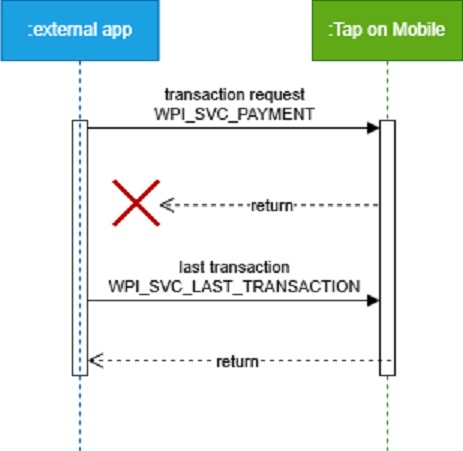
Be aware any payment solution will just store the last response. That implies that no other WPI request shall be done before the recovery.
For more information about proper error handling see WPI Error codes0
WPI_REQUEST - list of supported input parameters
For WPI_SVC_LAST_TRANSACTION, an empty JSON must be sent in the WPI_REQUEST. The function does not expect any additional input parameters.
WPI_RESPONSE - list of supported output parameters
The structure of WPI_RESPONSE depends on the previously invoked function — the WPI_RESPONSE contains the response from the previously called intent.
Receipt Format
Tap on Mobile provides three options for transaction confirmation.
- A text-based confirmation returned in the intent response.
- A complete set of data required to build the confirmation independently, provided as JSON returned in the intent response.
- A confirmation displayed in Tap on Mobile before exiting the intent.
The type of notification depends on the receiptFormat parameter sent in the WPI_REQUEST.
The following combinations are possible:
json"receiptFormat": ["FORMATTED"]
A text-formatted confirmation is returned in the response; the confirmation is not displayed in Tap on Mobile.
This is the default option, used when receiptFormat is not sent."receiptFormat": ["JSON"]
A set of data for building the confirmation is returned in the response; the confirmation is not displayed in Tap on Mobile."receiptFormat": ["JSON", "FORMATTED"]
Both a set of data for building the confirmation and a text-formatted confirmation are returned in the response; the confirmation is not displayed in Tap on Mobile."receiptFormat": []
The confirmation is not displayed in Tap on Mobile and is not returned in the response.
A text-based confirmation returned
For "receiptFormat": ["FORMATTED"], the following structure is included in the response.
"receipt": \{
        "formatted": \{
            "client": "This is to confirm your transaction     \n registered at:                          \n ----------------------------------------\n APM TEST & Merchant                     \n APM street 1                            \n APM city 1234                           \n ----------------------------------------\n 05.12.2025 14:23:06                     \n VISA       **** **** **** 0013          \n Amount:                       PLN 110,00\n Tip Amount:                    PLN 12,10\n Total Amount:                 PLN 122,10\n Exchange rate:       PLN 1,00 - EUR 0,24\n DCC amount:                    EUR 29,30\n Markup incl.:                    21,00 %\n I have been offered a choice of         \n currencies and I accept the final       \n amount in transaction currency.         \n Currency conversion provided by         \n Worldline.                              \n Transaction details:                    \n Status:                          CLEARED\n Authorization code:           (00)000671\n ARQC:                   745CF00E167FA050\n AID:                      A0000000031010\n Contactless                             \n Card expiry date:                   2912\n Type:                               SALE\n POS ID:                         WLIN0006\n MID:                           102003271\n Reference:                   sprawdzMnie\n VISA\n ",
            "merchant": "This is to confirm your transaction     \n registered at:                          \n ----------------------------------------\n APM TEST & Merchant                     \n APM street 1                            \n APM city 1234                           \n ----------------------------------------\n 05.12.2025 14:23:06                     \n VISA       **** **** **** 0013          \n Amount:                       PLN 110,00\n Tip Amount:                    PLN 12,10\n Total Amount:                 PLN 122,10\n Exchange rate:       PLN 1,00 - EUR 0,24\n DCC amount:                    EUR 29,30\n Markup incl.:                    21,00 %\n I have been offered a choice of         \n currencies and I accept the final       \n amount in transaction currency.         \n Currency conversion provided by         \n Worldline.                              \n Transaction details:                    \n Status:                          CLEARED\n Authorization code:           (00)000671\n ARQC:                   745CF00E167FA050\n AID:                      A0000000031010\n Contactless                             \n Card expiry date:                   2912\n Type:                               SALE\n POS ID:                         WLIN0006\n MID:                           102003271\n Reference:                   sprawdzMnie\n VISA\n "
        }
}
In the client and merchant tags, the text confirmation intended respectively for the customer and the merchant is returned. The newline character \n is used to indicate line breaks in the text.
A complete set of data required to build the confirmation
For "receiptFormat": ["FORMATTED"], the following structure is included in the response.
"receipt": \{
"json": \{
            "acquirerIdentifier": "14008500000F",
            "additionalData": \{
                "transactionType": "AUTH",
                "transactionStatus": "CLEARED",
                "applicationCryptogram": "745CF00E167FA050",
                "cid": "ARQC"
            },
            "amount": 12210,
            "applicationIdentifier": "A0000000031010",
            "authorizationCode": "00 000671",
            "brandName": "WPI_BRAND_NAME_VISA",
            "cardDataInput": "WPI_CARD_DATA_INPUT_PROXIMITY_ICC",
            "cardExpiration": "2912",
            "cardholderVerificationMethod": "WPI_CVM_PIN_ONLINE",
            "currency": "PLN",
            "dccInfo": \{
                "dccAmount": 2930,
                "dccCurrency": "EUR",
                "dccDisclaimer": "I have been offered a choice of currencies and I accept the final amount in transaction currency. Currency conversion provided by Worldline.",
                "dccEcbIndicator": false,
                "dccExchangeRate": "0,24000",
                "dccMarkup": "21,00 %"
            },
            "duplicate": false,
            "legalIdentificationRequired": false,
            "maskedPan": "**** **** **** 0013",
            "operatorIdentifier": "102003271",
            "paymentSolutionReference": "ee002b63-09fe-4dcb-9681-5796607fd3c2",
            "receiptTargets": \{
                "client": \{
                    "description": "List of field names of the receipt to be included for the client receipt",
                    "items": [
                        "shopInfo",
                        "timestamp",
                        "brandName",
                        "maskedPan",
                        "currency",
                        "amount",
                        "tipAmount",
                        "dcc",
                        "transactionStatus",
                        "authorizationCode",
                        "applicationCryptogram",
                        "applicationIdentifier",
                        "transactionType",
                        "terminalIdentifier",
                        "operatorIdentifier",
                        "reference",
                        "cardExpiration"
                    ]
                },
                "merchant": \{
                    "description": "List of field names of the receipt to be included for the merchant receipt",
                    "items": [
                        "shopInfo",
                        "timestamp",
                        "brandName",
                        "maskedPan",
                        "currency",
                        "amount",
                        "tipAmount",
                        "dcc",
                        "transactionStatus",
                        "authorizationCode",
                        "applicationCryptogram",
                        "applicationIdentifier",
                        "transactionType",
                        "terminalIdentifier",
                        "operatorIdentifier",
                        "reference",
                        "cardExpiration"
                    ]
                }
            },
            "reference": "sprawdzMnie",
            "shopInfo": \{
                "address": "APM street 1, APM city 1234",
                "name": "APM TEST & Merchant"
            },
            "terminalIdentifier": "WLIN0006",
            "timestamp": "2025-12-05T14:23:06+01:00",
            "tipAmount": 1210
        }
}
A confirmation displayed in Tap on Mobile
For "receiptFormat": [], the transaction flow ends with the screen below.
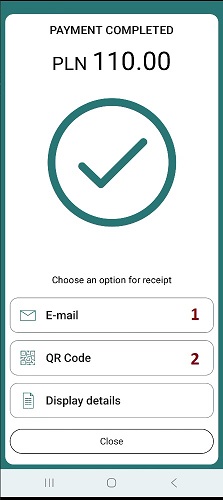
The user has the option to either send the confirmation via email in PDF format (1) or display a QR code that allows downloading the PDF confirmation (2).
WPI Error codes
The list of potential errors that may be returned by WPI is presented in the table below.
| Error condition | Description |
|---|---|
| WPI_ERR_COND_NONE | Transaction processed sucessfully without error. |
| WPI_ERR_COND_BUSY | Other intent request was during processing - in such situation both request (ongoing and new) will be finised. For ongoing error will be depend of curent status, for new request WPI_ERR_COND_BUSY wil be returned. |
| WPI_ERR_COND_CARD_READ_ERR | Card was refused durin reading (card is not supoorted or errors during card reading). |
| WPI_ERR_COND_GENERIC | NFC hardware not available/NFC hardware not available/ other technical error on device. |
| WPI_ERR_COND_HOST_REFUSAL | Transaction was refused by authorisation host or terminal is not properly registered and Tap on Mobile host refuse to proces transaction. |
| WPI_ERR_COND_INTERNAL | Application internal error\other unhandled errors. |
| WPI_ERR_COND_INVALID_AMOUNT | In request parameters entered invalid transaction amount, eg. 0. |
| WPI_ERR_COND_INVALID_CURRENCY | In request parameters entered invalid currency other then parametrised for terminal. |
| WPI_ERR_COND_INVALID_PASSWORD | Specific error — for this terminal, entering a PIN is required to perform a refund, and the user entered an incorrect PIN three times. |
| WPI_ERR_COND_INVALID_TRANSACTION_REQ | - Security errors during application start - Checkout functionality specyfic errors - mising/wrong checkoutid - refund or reversal of transaction was called but transaction does not exist, or can't be refunded/reversed. |
| WPI_ERR_COND_MISSING_MANDATORY_PARAMETER | One of thr mandatory parameter is missingi in WPI_REQUEST. |
| WPI_ERR_COND_NOT_INITIALIZED | The payment solution is not configured and cannot process the request. |
| WPI_ERR_COND_SERVICE_NOT_SUPPORTED | I/O errors, socket timeouts and other such technical problems. |
| WPI_ERR_COND_TIP_AMOUNT_EXCEEDS_MAXIMUM | Sended tipAmount is larger then limits definied for terminal. |
| WPI_ERR_COND_TIP_NOT_SUPPORTED_BY_PAYMENT_SOLUTION | Tipping not allowed for terminal but tipAmount parameter was send in WPI_REQUEST. |
| WPI_ERR_COND_TIP_NOT_SUPPORTED_BY_SERVICE_TYPE | tipAmount is not supported in this WPI functions (eg reversal does not support it) |
| WPI_ERR_COND_TLP_NOT_FINALIZED | Estey and TLP specific error - The transaction can only be refunded to the same card. |
| WPI_ERR_COND_TRANSACTION_TIMEOUT | Timeout caused by the customer — the time expired for card reading, PIN entry, etc. |
| WPI_ERR_COND_USER_CANCEL | Transaction cancelled by user before authorisation. |
| WPI_ERR_COND_WPI_VERSION_NOT_SUPPORTED | - Wrong, not suported version of WPI - Wrong ToM application version - Atestation error. |
| WPI_ERR_TLP_NOT_FINALIZED | Estey and TLP specific error - terminal is managed by TLP but activation not completed. At this moment, transaction can be performed on this terminal. |
| WPI_ERR_UPDATE_REQUIRED | - A newer version of the transaction is available and the user interrupted the intent call to download it. - An application update is required, but the user refused the update. |
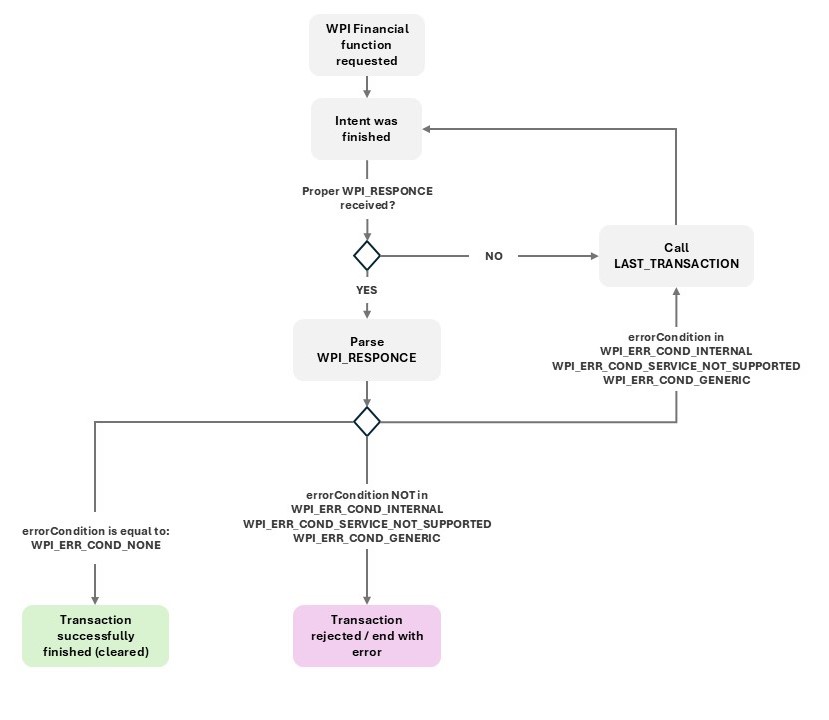
When handling errors, the following should be taken into account:
- In the event of a lost connection between the application and the backend during the transaction flow, there may be situations in which WPI returns an error, but the transaction is actually completed.
- The intent may return an empty response (for example, in the case of an application crash).
Therefore, for selected error types and in situations where an empty response is received, the LAST_TRANSACTION function should additionally be used to confirm the transaction result. The correct algorithm is shown in the diagram below.