API Reference
The complete Backend API specification as a merchant — every endpoint, request and response model, and schema you need to build your integration — is available in our interactive API reference.
Explore the current Tap on Mobile Backend API endpoints, parameters, and response models.
For earlier integrations as a reference.
OpenAPI specifications
You can also open or save the specifications directly without using the interactive viewer:
Swagger file
Tap on Mobile backend API specification can be found in the swagger file: swagger fil.
Attention If the API are not displayed , make sure to have /v3/api-docs in the search bar at the top of the screen
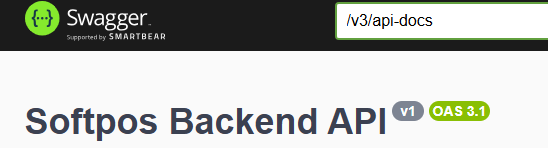
This swagger file is a machine-readable description of all available API and defines what the API offers and how to use it.
This swagger file is only available on the Worldline EU sandbox environment, but applies to all acquirers and environments. Behind every API, there is a label that indicates the type of access that is needed to use the corresponding API; MRC for merchant level users, ACQ for acquirer level and ADM for admin.
Some of the most common API are:
POST /api/v1/users/info: obtaining current context and permissions of the usersPOST /api/v1/transactions/search; find transaction(s) based on input filtering criteriaPOST /api/v1/transactions/export/csv: export transactions in CSV format based on filterPOST /api/v1/merchants/searchPOST /api/v1/devices/searchPOST /api/v1/users/searchPOST /api/v1/terminals/{id}/registration-token: Generate or retrieve registration code for terminalPOST /api/v1/terminals/{id}/registration-token/refresh:DELETE /api/v1/terminals/{id}/registration-token/revokePOST /api/v1/terminals/search: look for available terminalsPOST /api/v1/terminals/{id}/unregister: Unregister Terminal from DevicePOST /api/v1/transactions/{id}/pdf-receipt: get a pdf-receipt for a specific transaction IDPOST /api/v1/transactions/{id}/email-receipt: send a receipt by email for a specific transaction,
Complete list of function request elements is available in ToM API specification (https://sandbox-wl-emea.softpos.eu/swagger-ui/index.html?configUrl=/v3/api-docs/swagger-config#/Terminals/search_3). Tables below summarize most important parameters and function filters.
Example parameters used in many request types:
| Request Parameters | Description |
|---|---|
| Page | Integer defining a zero-based page index (default is 0) |
| Size | Integer defining number of items to be returned in a single page (default is 10) |
| Sort | String defining response list sorting criteria in the format: property,(asc|desc). Default sort order is ascending. Multiple sort criteria are supported |
| Request body | Description |
|---|---|
| contract_id | Merchant tier level identifier or tier level identifiers combination defining which part of terminal structure should be returned |
| vat_id | Merchant tier level identifier or tier level identifiers combination defining which part of terminal structure should be returned |
| Mid | Merchant tier level identifier or tier level identifiers combination defining which part of terminal structure should be returned |
| Tid | Terminal identifier. Adding this field may for use cases where current terminal details need to be checked |
| Connected | Terminal assignment status. true - means that tid is currently linked to a device; false - means that terminal is currently not assigned to any device and available for registration. In this case - id_device field will be attached to ID of device |
| Disabled | Flag informing whether the terminal condition is not temporarily restricted from performing operations |
API Authorization
The authorization is based on OAUTH2 standard (https://oauth.net/2/). OAuth 2.0 is an authorization framework that lets a user grant a third‑party application limited access to their resources on a server, without giving that app their login credentials.
After obtaining the token for the used credentials, all API that are accessible with the level for the user can be used. We refer to the received token as access_token.
Request Parameters
The following parameters are used in the OAuth2 token endpoint (/oauth2/token).
First you need to obtain the OAUTH2 token to use for further requests:
| Parameter | Description |
|---|---|
| grant_type | A string indicating which grant type is being used: client_credentials app-to-app access with its own credentials |
| Scope | The scope of the OAuth2 token, indicating the permissions that are granted to the client |
| client_id | A unique identifier for the client application, issued by the authorization server |
| client_secret | A secret string used to authenticate the client application with the authorization server |
POST {baseUrl}/oauth2/token
{
  "grant_type": "client_credentials",
  "client_id": "client_id",
  "client_secret": "client_secret"
}
According to RFC 6749 - grant_type should be sent in headers with x-www-form-urlencoded
Authorization handled can be BASIC (based on client_id and client_secret) as standard approach or alternatively with JWT certificates.
Response Parameters
The response from the token endpoint will include a number of parameters:
| Parameter | Description |
|---|---|
| Access_token | A string containing the access token, which will be used for the terminal authentication endpoint |
| Scope | The scope of the access token, indicating the permissions that are granted to the client |
| token_type | The type of access token. For example "Bearer" |
| expires_in | The number of second before the access token expires and a new one must be requested. This value is configurable per channel definition at backend side. |
baseUrl - is the path to the environment ie. (https://sandbox-wl-emea.softpos.eu)
Example response:
{
  "access_token": "eyJraWQiOiI4MDBhIi...<truncated>",
  "scope": "openid vpos",
  "token_type": "Bearer",
  "expires_in": "29999"
}
This token must be attached to each request to the API in authorization header.
Transaction search request
Sample transaction search request
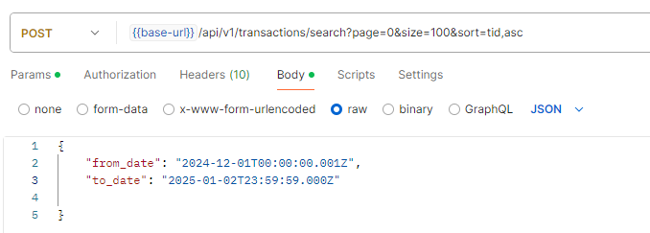
Sample response to transaction search request
API is equipped with pagination mechanism, x-total-count parameter in the header provides total number of records returned in whole set. Only the records accessible by the user permissions and the context are returned.
If multiple records are returned (it can be checked with , x-total-count parameter in the response header) and their number is higher than page limit, then you need to obtain next set of records increasing current number of records page (as input url parameter).
Each object inside the system has its own unique ID, based on UUID format (as defined in RFC 9562).