Apple T&C for Tap to Pay on iPhone
What is Apple T&C for Tap to Pay on iPhone
Apple’s Terms and Conditions (T&C) acceptance for Tap to Pay on iPhone is a legal agreement between the merchant and Apple Payments Services LLC that registers your business to enable contactless payments directly on a supported iOS device using an approved payment service provider (PSP, Worldline in this case).
Key Details of the Agreement
- What gets linked: When you accept the T&C, your Apple Account is linked to your merchant account, along with your unique merchant ID (provided by Worldline), your merchant category code (MCC), and your organization/business name.
- One-Time Acceptance: You only need to accept these terms once per unique merchant identifier, even if you start using the Tap to Pay feature across multiple iPhones.
- Apple’s Role: Apple provides the Tap to Pay platform "as is" to facilitate the connection, managed via Apple Payments Services LLC. Apple does not process funds, control your PSP’s services, or store raw card numbers (PANs) on its servers.
- Rules and Restrictions: You agree to use the platform strictly for lawful, bona fide commercial/business transactions. Prohibited, fraudulent, or personal-use transactions can lead to suspension or termination of your seller status.
- Data Handling: Apple collects limited transaction metrics (such as transaction amounts) for 25 days for industry compliance (PCI), while cardholder data is protected inside the iPhone's Secure Element and passed exclusively to your PSP.
You can review the official framework on Apple Legal - Tap to Pay on iPhone for Merchants (https://www.apple.com/legal/internet-services/business-services/tap-to-pay-on-iphone/terms-en.html)
Acceptance methods
There are two (2) different methods for a merchant to accept the Tap to Pay on iPhone Terms and Conditions:
- Accept T&Cs on the Merchant Device: The app prompts the merchant to view and accept the Tap to Pay on iPhone Terms and Conditions on their device.
- Accept T&Cs in Apple Business: The merchant accepts the Tap to Pay on iPhone Terms and Conditions in Apple Business Connect(Business Connect). In Business Connect, the merchant can accept the T&Cs and manage their profile.
Accept T&Cs on the Merchant Device
Each time when the reader is used, it will check if the Apple T&C have been accepted for this merchant. If they have not been accepted, the SDK will call an Apple method that will show a native iOS screen that allows to accetpted the Apple T&C
Accept T&Cs in Apple Business
The merchant is redirected from the Tap on Mobile portal to Apple Business and accepts the T&Cs using their Apple Account. The merchant is then redirected back to the merchant portal, and the merchant linking status is also returned as a part of the redirect.
Merchant experience The merchant experience for this acceptance method is as follows:
- The merchant signs in to the Tap on Mobile portal.
- Use the "Open Busienss Connect" button at the Tap on Mobile portal. See below screenshot when merchant not linked.
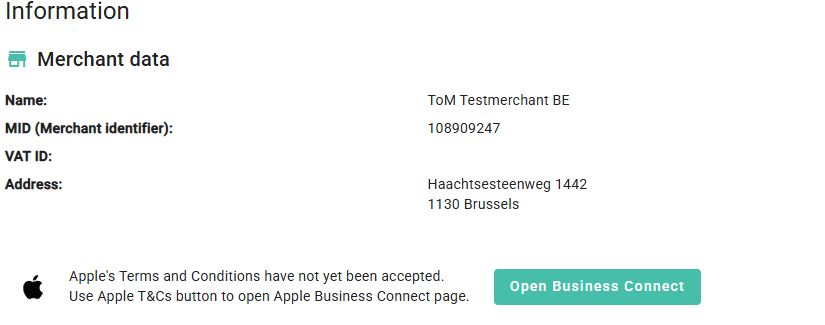
- The merchant is presented with Apple Business in a pop-up window.
- In Apple Business, the merchant signs in with the Apple Account associated with their business, accepts the Tap to Pay on iPhone Terms and Conditions, and sets up their company and brand information to be linked to their merchant ID. The merchant ID and merchant business name are pre-populated using the information provided in the merchant token.
- Merchants need to provide information to complete verification for their company and business. Merchants can upload their logo during Brand setup in Business Connect to customize the Tap to Pay on iPhone payment sheet with their logo.
- After the merchant accepts the T&Cs, merchant can use Tap to Pay on iPhone with that merchant ID on any supported device
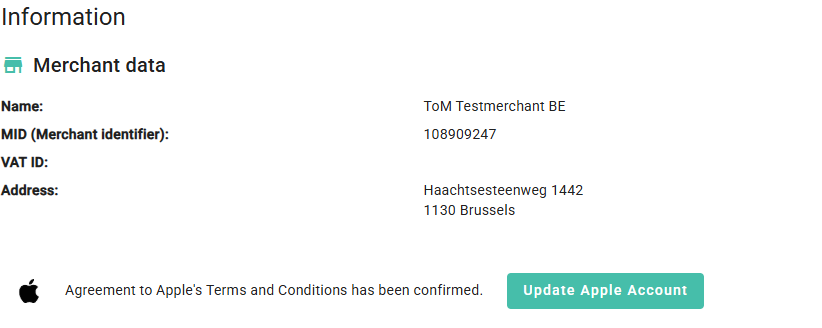
Once Apple T&C have been accepted, this is shown on the Tap obn Mobile portal as shown in the below screenshot. When using the "Update Apple Account" button, this allows to assign the merchant to another Apple ID.