SmartPOS API Overview
The SmartPOS API is an abstraction layer that provides developers with access to the features and capabilities of SmartPOS devices, which are specialized Android-based devices designed for payment processing and related applications.
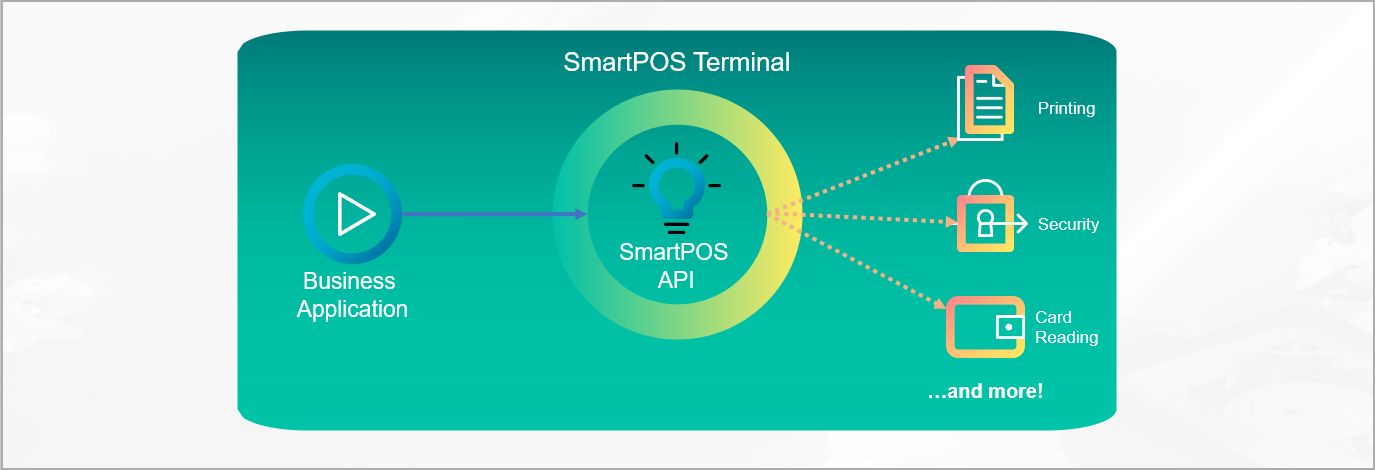
Why Should You Use SmartPOS API?
Compared to standard Android devices, SmartPOS devices have a number of additional features and capabilities that make them well-suited for use in payment processing and related applications:
Access to the integrated hardware printer for receipts and documents
Ensure confidentiality and integrity of data exchanged between your application and the device
Access to contactless and contact card readers for non-payment use cases in your application
Access device-specific information for analysis or customizing user experience
How to Use SmartPOS API?
The SmartPOS API is an Android service that can be integrated into any Business application. It provides access to a range of hardware features and capabilities that are specific to SmartPOS devices, including NFC reading/writing, printers and more. It also provides access to system information, which is essential for ensuring the security and confidentiality of sensitive information.
To use the SmartPOS API, developers need to:
Get a SmartPOS device from Worldline for development and testing
Integrate the SmartPOS API library into your Android application
Bind to the SmartPOS API service using Android's AIDL interface
Access hardware features like printer, NFC, and security services
Complete API reference with all methods and code examples
Where Can You Use SmartPOS API?
SmartPOS API is currently available on the following devices offered by Worldline:
| Castles Saturn S1F2 |
|---|
| Castles Saturn S1P |
| Castles Saturn S1U2 |
| Castles Saturn S1U2-M4 |
| Ingenico VALINA |
| Ingenico AXIUM DX8000 |
| Ingenico AXIUM EX8000 |
| Ingenico AXIUM RX5000 |
API Interfaces
The SmartPOS API provides several interfaces for different functionality:
| Interface | Description |
|---|---|
| SmartPOS Info | Access generic information about the SmartPOS device for analysis, reporting, or customizing user experience |
| Security | Establish secure connections with compliant cipher suites for confidential data exchange |
| Printer | Interact with the hardware printer for receipts and documents |
| NFC Reader | Read and write to MIFARE and FELICA chip cards using NFC technology |
| ChipCard Reader | Read Belgium eID cards |
| Feature Check | Validate supported features of the SmartPOS device |
For payment processing, use the WPI (Worldline Payment Interface). SmartPOS API is complementary to WPI for non-payment related terminal interactions.