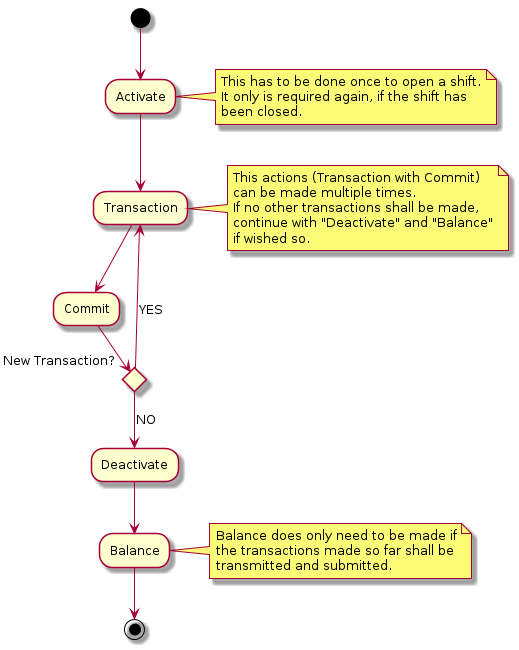
Operation Overview
Follow these basic steps for using the TIM API:
  1. Create [TerminalSettings](https://six-tim.github.io/timapi/doc/swift/doc/Classes/TerminalSettings.html) and initialize connection parameters (see Setup Configuration)
  2. Create [Terminal](https://six-tim.github.io/timapi/doc/swift/doc/Classes/Terminal.html) instance using the created [TerminalSettings](https://six-tim.github.io/timapi/doc/swift/doc/Classes/TerminalSettings.html)
  3. Set some properties where required:
     * Define a [POS ID](https://six-tim.github.io/timapi/doc/swift/doc/Classes/Terminal.html#/s:6TimApi8TerminalC5posIdSSvp)
     * create **mandatory** list of [EcrInfo](https://six-tim.github.io/timapi/doc/swift/doc/Classes/EcrInfo.html) and add with [addEcrData](https://six-tim.github.io/timapi/doc/swift/doc/Classes/Terminal.html#/s:6TimApi8TerminalC10addEcrDatayAA0E4InfoC03ecrG0_tF)
     * create list of [PrintOptions](https://six-tim.github.io/timapi/doc/swift/doc/Classes/PrintOption.html) and set with [.printOptions](https://six-tim.github.io/timapi/doc/swift/doc/Classes/Terminal.html#/s:6TimApi8TerminalC12printOptionsSayAA11PrintOptionCGvp)
     * [addListeners](https://six-tim.github.io/timapi/doc/swift/doc/Classes/Terminal.html#/s:6TimApi8TerminalC11addListeneryAA0cE0_p8listener_tF)
  4. [Connect](https://six-tim.github.io/timapi/doc/swift/doc/Classes/Terminal.html#/s:6TimApi8TerminalC7connectyyKF) and [Login](https://six-tim.github.io/timapi/doc/swift/doc/Classes/Terminal.html#/s:6TimApi8TerminalC5loginyyKF). This can be done automatically, when the first terminal operation is called or manually using the login method.
  5. Use terminal operation functions.