Logging
The TIM API is able to log an extensive set of events and actions within the TIM API. It's key that logs are created and stored properly. Logging enables support and makes bug-tracking much easier.
Log Level
By default the TIM API has a Logger that defines how much logging is generated inside the TIM API. To this Logger different handlers can be added, e.g. ConsoleHandler for logging into the debug console or FileHandler to log into a file. By default a FileHandler is added to the TIM API logger.
The following logging levels are valid:
  * ALL
  * FINEST
  * FINER
  * FINE
  * CONFIG
  * INFO
  * WARNING
  * SEVERE
  * OFF
The logging level can be adjusted programatically as follows after a terminal object has been created:
// Set the TIM API internal logging level
Logger.getLogger(terminal.getLoggerName()).setLevel(Level.ALL);
// Set the logging level of the different handlers that have been added to the logger
Handler[] handlers = Logger.getLogger(terminal.getLoggerName()).getHandlers();

for (Handler handler : handlers) {
    handler.setLevel(Level.FINEST);
}
// To add a special handler to the TIM API logger
Logger.getLogger(terminal.getLoggerName()).addHandler(myHandler);
Log Rotation Handling
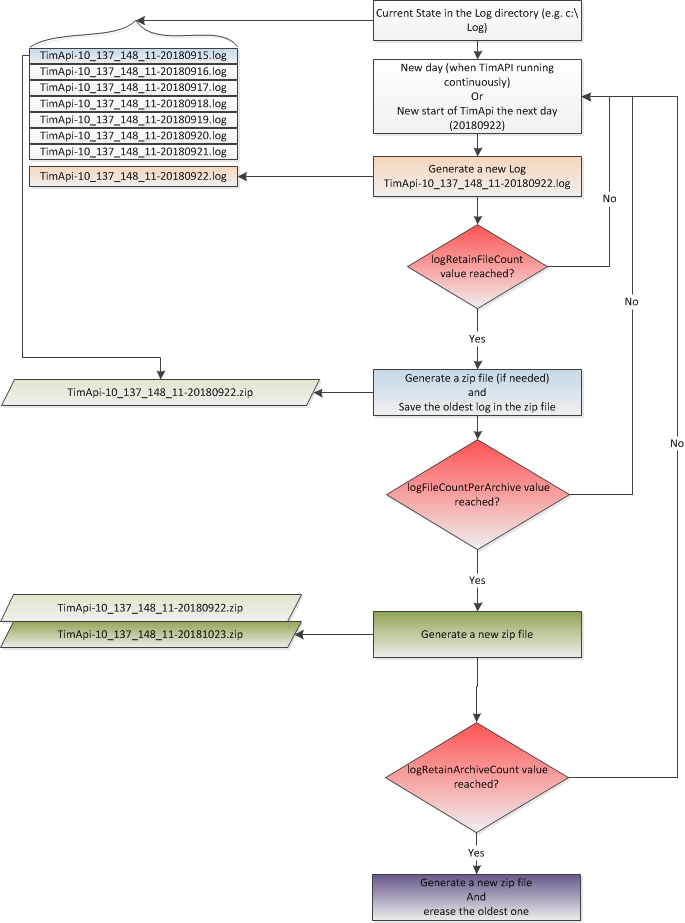
The TIM API allows to configure a log file rotation handling, which means that it can be defined how many log files should be kept before deleting or archiving them. Furthermore it can be defined how many log files are allowed in one archive and how many archives should be kept before deleting the oldest. To define this behaviour the following parameter can be used, which are located in TerminalSettings if they shall be set programatically. If not they can be also set in the TimApi.cfg file.
* [LogRetainFileCount](https://six-tim.github.io/timapi/doc/java/doc/com/six/timapi/TerminalSettings.html#setLogRetainFileCount-int-): Defines how many log files will be kept before deleting (or archiving) the oldest.
-
LogFileCountPerArchive: Defines how many log files will be put in an archive before creating a new archive.
-
LogRetainArchiveCount: Defines how many archives will be kept before deleting the oldest. 0 = no archiving
The following diagram shows the log rotation handling process: