Operation Overview
Follow these basic steps for using the TIM API:
  1. Create [terminal_settings](https://six-tim.github.io/timapi/doc/c/doc/terminal__settings_8h.html) and initialize connection parameters (see Setup Configuration)
  2. Create [terminal](https://six-tim.github.io/timapi/doc/c/doc/terminal_8h.html) instance using the created [terminal_settings](https://six-tim.github.io/timapi/doc/c/doc/terminal__settings_8h.html)
  3. Set some properties where required:
     * Define a [pos id](https://six-tim.github.io/timapi/doc/c/doc/terminal_8h.html#ae4a64a53823f3de88c66c9780d96475d)
     * create **mandatory** list of [ecr_info](https://six-tim.github.io/timapi/doc/c/doc/ecr__info_8h.html) and add with [ta_terminal_add_ecr_data](https://six-tim.github.io/timapi/doc/c/doc/terminal_8h.html#ac6e2071bf93b33885f8d678cfe12ab9b)
     * create list of [print_options](https://six-tim.github.io/timapi/doc/c/doc/print__option_8h.html) and set with [set_print_options](https://six-tim.github.io/timapi/doc/c/doc/terminal_8h.html#af80da59c381fabacf1107620a4fd7e9a)
     * [ta_terminal_add_listeners](https://six-tim.github.io/timapi/doc/c/doc/terminal_8h.html#a818466e97be59b5d4ecf9799d74b8074)
  4. [connect](https://six-tim.github.io/timapi/doc/c/doc/terminal_8h.html#a73af37fdbac5972361a434cdabb83a36) and [login](https://six-tim.github.io/timapi/doc/c/doc/terminal_8h.html#a227343e36d8f4956c9342945109b3b26). This can be done automatically, when the first terminal operation is called or manually using the login method.
  5. Use terminal operation functions.
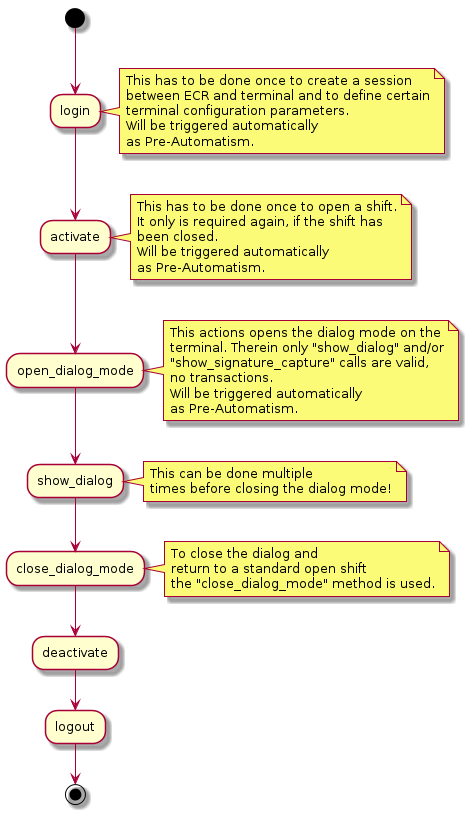
A basic flow to show a dialog is: