Network Requirements
Base edition
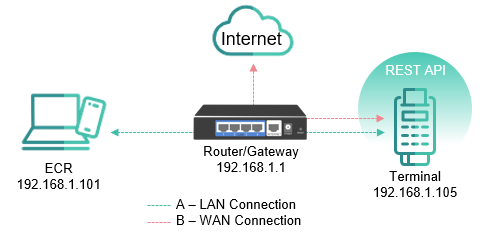
In its default configuration the API operates over HTTPS, the server runs directly on the payment terminal. It is intended to communicate with it from a client within the local network. This product is not compatible with a cloud-native ECR. It is possible that you can simulate a local network connection using VPN's or similar software however this is not intended and not officially supported.
Example LAN network topology:
WAN extension
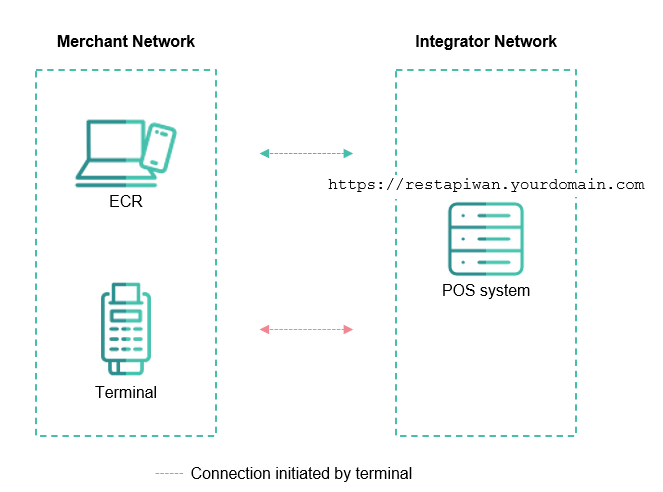
We have expanded our connectivity options! As of version 2.4, the terminal can now operate in client mode, allowing it to initiate outbound connections over WAN. This enables you to host your own server and push messages directly to the terminal, offering greater flexibility for installations. See connection models for a diagram and WAN - API specification for full details.
Network Settings
The terminals rely on having an internet connection. However, a terminal connected to ethernet should not be connected directly to the Internet – it must be placed behind a firewall to prevent inbound connections from the Internet to the device. The terminals do not rely on any other services. Specify MAC addresses for firewall rules to ensure that they follow the terminal if it changes IP address, or specify a static IP.
The payment terminal requires access to Worldline's payment services in order to operate properly. It's the merchant's responsibility to ensure that the payment terminal is allowed access to these services from the merchant's local network.
Configure your network to allow outgoing traffic to the following services:
| Target | TCP port(s) |
|---|---|
| 213.232.97.35 | 975-979 |
| 91.224.37.30 | 975-979 |
| *.samport.com | 443 (https) |
Do not hardcode IPs for these services as they can change over time.